

You tapped the recharge button. The money left your bank account. But when you refreshed the app, the coins were gone. It looks like a scam, but panic won't fix it. In most cases, the transaction is stuck between the payment gateway and the game server.
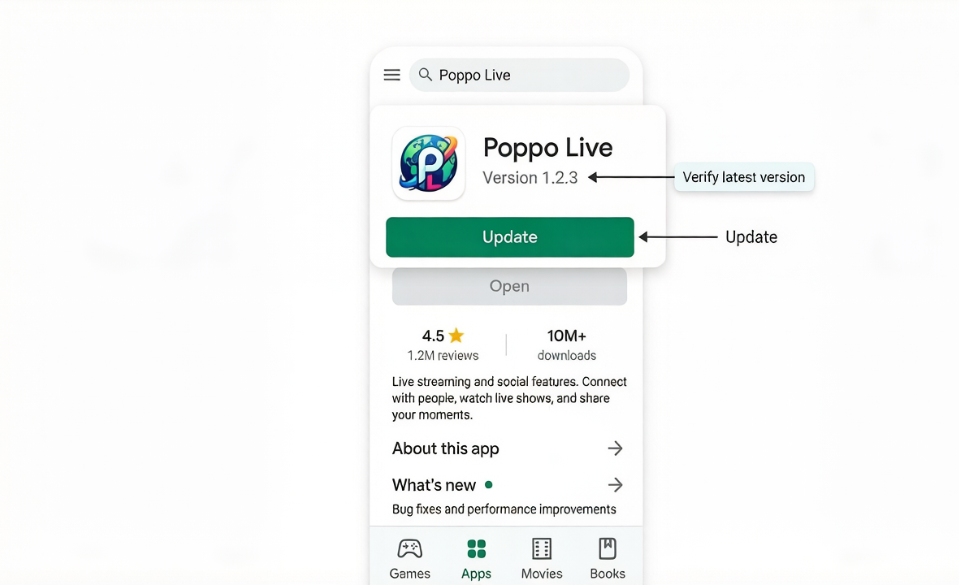
Network congestion gets the blame often, but there is a technical angle users overlook. When your Poppo Live payment fails and the order status doesn't update, the problem often lies on your handset. Outdated application versions or unsupported operating system builds can prevent the payment callback from registering. Ensure you downloaded the app from a secure source like trusted gaming hubs to avoid modified clients that break payment handshakes.
Before you dispute the charge with your bank, verify the health of your device environment. Payment gateways require specific security protocols that older app versions do not support. If your software cannot handshake properly with the payment processor, the order status remains pending indefinitely.
We focus on the technical specifications that cause recharge failures. By ensuring your device and app are fully validated, you can often clear the pending status without waiting for external intervention.
Root Cause Matrix
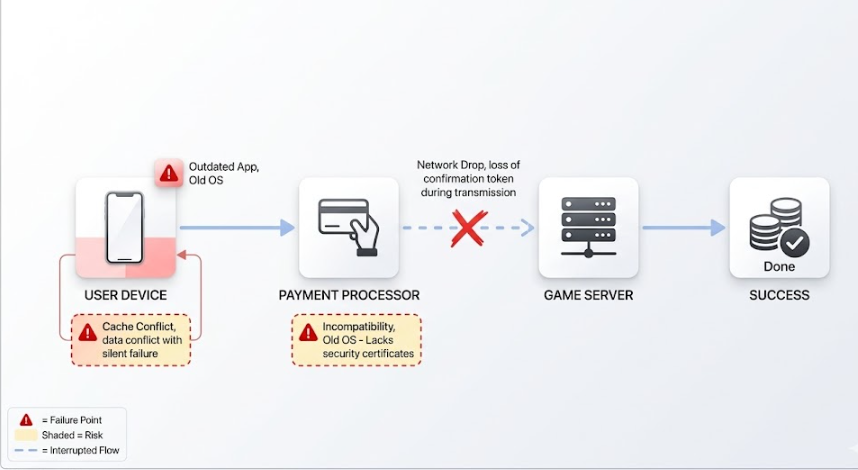
Understanding why a recharge fails requires looking at the entire transaction chain. It is not just about balance. The process involves your device, the app interface, the payment processor, and the game server. If any link breaks, the order status will not update.
Version mismatch is the most frequent cause. When Poppo Live updates its payment SDK, older app versions lose the ability to communicate transaction completion. Similarly, if your device operating system is too old, it may lack the security certificates required by modern payment gateways. This results in a silent failure where money is taken, but the success signal never reaches the game.
Network instability during the handshake process is another major factor. If your connection drops exactly when the payment provider is sending the confirmation token, the server records the payment as incomplete. Additionally, cached data within the app can store old configuration files that conflict with new transaction requests.
App Version Outdated: Missing critical payment security patches.
OS Incompatibility: Device operating system too old for current gateway standards.
Cache Corruption: Stored data conflicting with new transaction requests.
Network Interruption: Connection drop during payment confirmation handshake.
Step-by-Step Troubleshooting
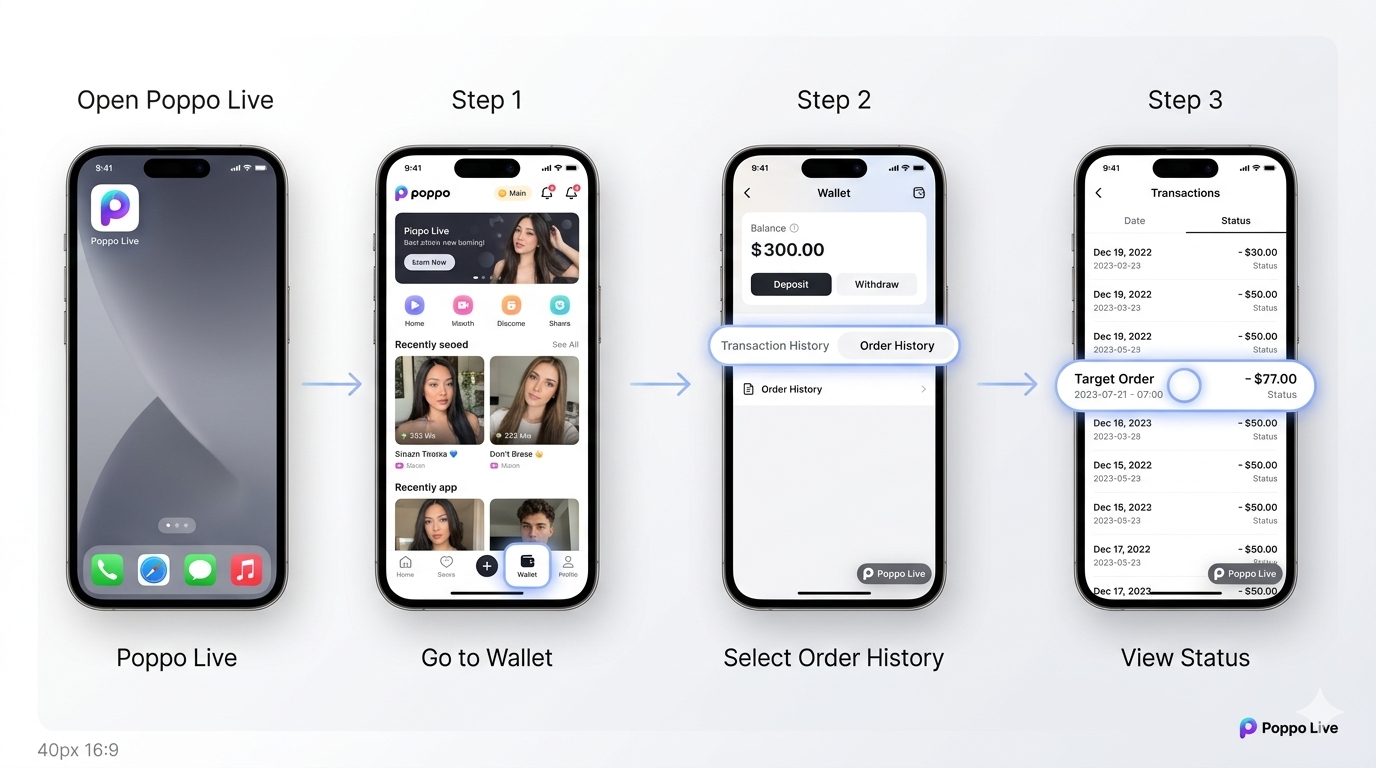
Resolving this issue requires a methodical approach. Do not simply reinstall the app immediately, as this might delete local order logs needed for verification. Follow these steps in order to isolate and fix the validation error.
1. Verify Order Status in History
Open the app and navigate to your wallet or recharge history. Look for any entries marked as pending or processing. If the order exists there, the server has received some signal, and it is likely a delay. If no order exists, the transaction failed to register entirely, pointing to a local device issue.
2. Validate App Version
Go to your device's app store and check for updates. Do not rely on the auto-update feature. Manually force a check to ensure you are on the absolute latest build. Developers often push hotfixes for payment issues that are not announced in public changelogs.
3. Check Device Operating System
Navigate to your device settings and check for system updates. Payment gateways frequently update their security requirements. If your Android or iOS version is several generations behind, the payment processor may reject the transaction silently. Update your OS to the latest stable version available for your model.
4. Clear App Cache
Go to your device settings, find the application manager, and clear the cache for Poppo Live. Do not clear data unless necessary, as this logs you out. Clearing cache removes temporary files that might be holding onto old payment configurations causing the conflict.
5. Switch Network Connections
If you are on Wi-Fi, switch to mobile data, or vice versa. Sometimes specific IP ranges are flagged or experience routing issues with payment servers. A fresh network connection can establish a cleaner pathway for the transaction confirmation to reach the server.
If Still Not Resolved
If you have completed all validation steps and the coins still have not arrived, you must wait. Payment reconciliations between banks and gaming platforms can take up to twenty-four hours. During this window, the system is automatically attempting to match your bank deduction with the game account.
Do not attempt to recharge again immediately. Duplicate transactions complicate the refund process and can lead to account flags. If the order remains pending after twenty-four hours despite having the correct app and device version, the issue is likely on the server side and requires manual intervention.
Risk Warnings
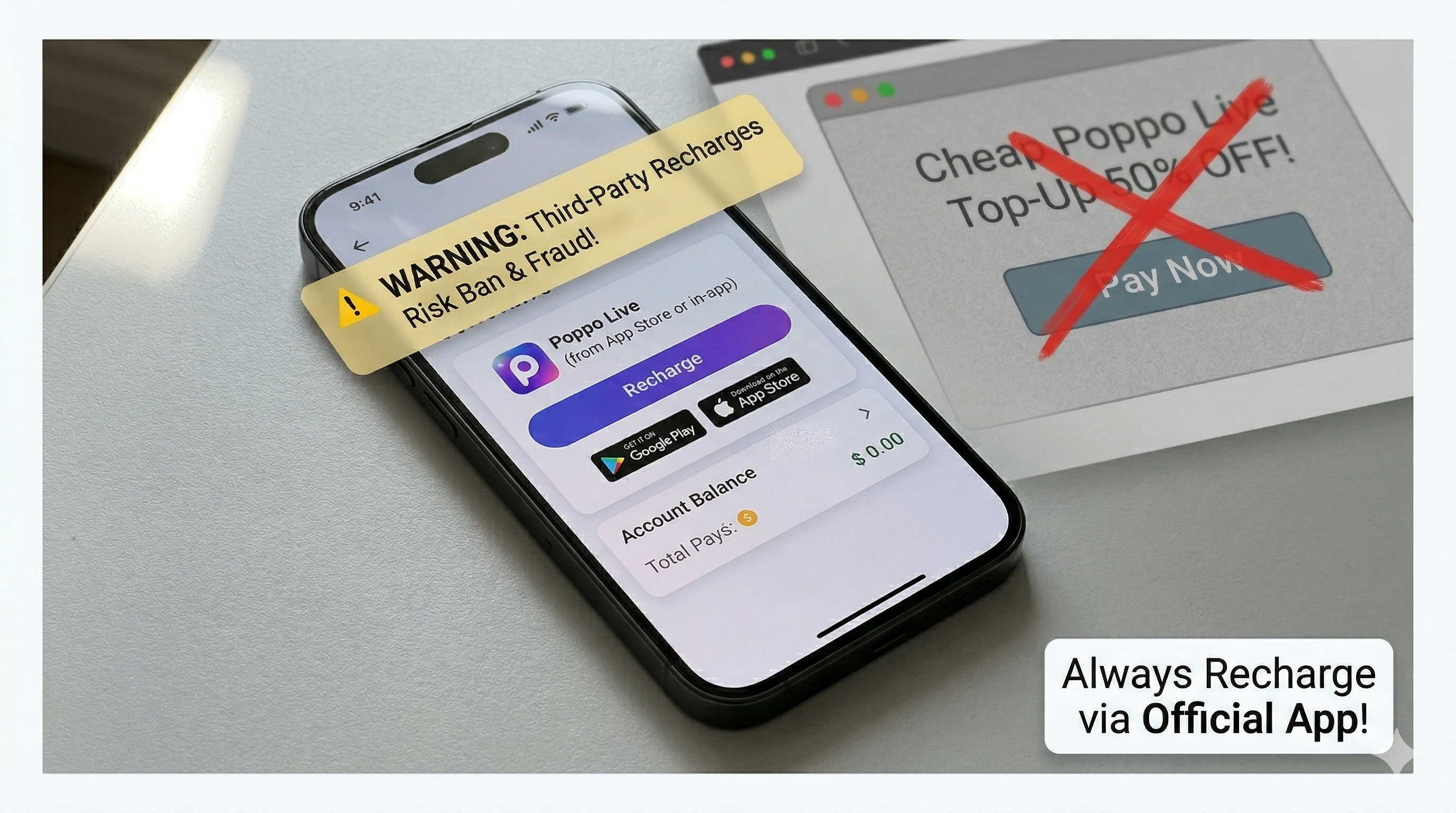
Be extremely cautious when searching for solutions online. Third-party top-up sites often claim to fix pending orders but actually pose significant security risks. These sites may ask for your login credentials or payment details, leading to account theft or financial fraud.
Only use the official in-app purchase system. Stick to official channels or verified platforms such as reliable gaming sites. Unauthorized recharge methods violate the terms of service and can result in a permanent ban. If the official channel fails, it is safer to wait for a refund than to risk your account security with unofficial vendors promising instant fixes.
Before Contacting Official Support
Customer support can only help if you provide concrete evidence. Vague complaints about missing coins are difficult to trace. Before opening a ticket, gather all necessary documentation to speed up the resolution process.
Transaction ID: Find the unique order number from your bank statement or app store receipt.
Screenshots: Capture the pending order status in the app and the successful deduction in your bank app.
Device Info: Note your specific phone model and current operating system version.
App Version: Record the exact version number found in the app settings.
FAQ
How long does a pending recharge usually take?
Most transactions complete within minutes. However, during high traffic or maintenance, it can take up to twenty-four hours for the system to reconcile the payment and update your balance.
Will I get a refund if the payment failed?
Yes, if the transaction is not completed on the server side, the funds are typically reversed automatically by the payment processor within three to seven business days.
Does updating the app delete my account data?
No, updating the application preserves your account progress and balance. Only clearing app data or uninstalling without binding your account could risk data loss.
Why does my bank show charged but the app shows nothing?
This indicates a communication failure. The bank processed the request, but the confirmation signal did not reach the game server. This is usually resolved automatically or via support ticket.
Can I use a different payment method to retry?
Yes, if one method fails repeatedly, trying a different card or wallet can bypass specific gateway issues. Ensure your app is updated before trying a new method.
Bottom Line
Payment failures are rarely about missing money and mostly about broken communication links. By focusing on device and app version validation, you address the most common technical barrier preventing order completion. Most users resolve the issue by simply updating their software and clearing cached conflicts.
Patience is key when dealing with financial transactions online. Avoid duplicate charges and gather your evidence before escalating the issue. With the correct technical environment and proper documentation, these recharge discrepancies are almost always resolvable without permanent loss.