

You pay, the app says the transaction went through, and your Zenless Zone Zero balance still looks exactly the same. No Monochrome. No useful update. At that point, the main question is not just whether the payment failed. You need to figure out if the order is delayed, attached to the wrong account details, or never turned into a valid game recharge in the first place.
That difference matters. A lot of players make the situation worse by trying a second purchase too quickly, or by assuming the bank deduction tells the whole story. Usually it does not. Before you spend again, check what you actually bought, where it was supposed to go, and whether the order status says pending, completed, or failed.
What You Actually Get
With an official Zenless Zone Zero recharge, what you receive depends on the package you picked. In most cases, that means Monochrome delivered directly to the account tied to the UID and server entered during checkout. If payment succeeded but your balance did not change, start there. A wrong account match is often more likely than a bank-side issue.
The usual flow is simple enough: pick the game, enter your UID, confirm the server, choose a package, finish payment, and wait for the order status to update. If everything matches, delivery is usually automatic. If something goes wrong, it usually falls into one of a few categories: payment authorization failed, payment was captured but the order is still pending, the wrong UID was entered, the wrong server was selected, or delivery is just lagging on the game side.
When players say they did not receive the recharge, that can mean three different things. The payment never fully completed, so no order exists. The order exists, but fulfillment is delayed. Or the recharge was sent to a different account because the UID or server was wrong. Those are not the same problem, and they do not have the same fix. Do not pay again until you know which one you are dealing with.
Keep four details ready while you check: your UID, server name, payment timestamp, and the transaction or merchant reference from the payment provider. Screenshots help. Exact numbers help more.
Price-to-Value Check
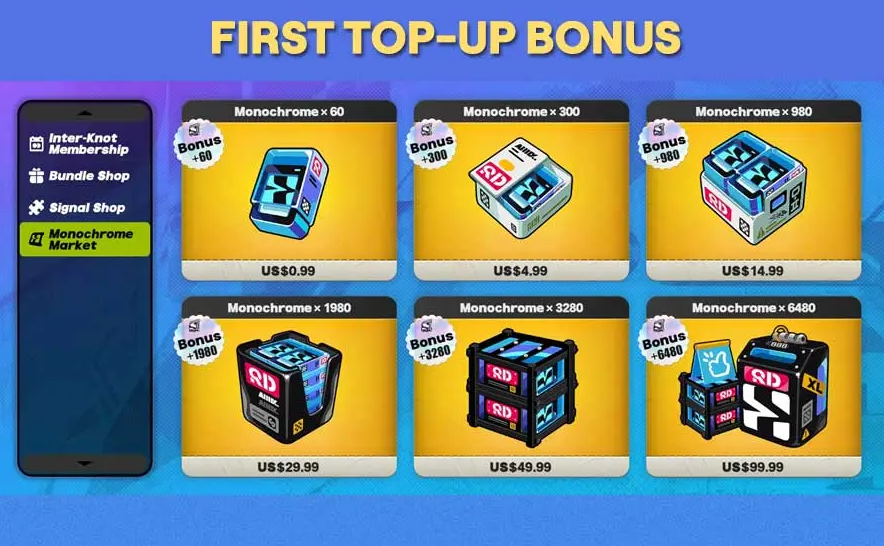
Before you retry a failed order, it is worth pausing for a minute and asking whether the package you chose still makes sense. Not every recharge option has the same value for every player. A smaller package is fine if you only need to close a gap for a banner or a specific purchase. A larger one makes more sense when you already know what you plan to spend and you are not in the middle of a payment issue.
This is where people often overspend. Something goes wrong, so they buy a different package just to test whether the system works. Sometimes that does nothing except create a second charge or push spending higher than planned. Better to confirm the first order's status before deciding on another package.
The best value is usually the package that fits a clear goal. If you need a specific amount of Monochrome, buy toward that target instead of chasing a package that only looks like a better deal on paper. If you are just testing whether your account details and payment flow work, a smaller recharge limits the downside. If you top up regularly and the official process has worked well for you before, larger packages can be more practical simply because they reduce repeat checkouts.
Value is not just about bonus currency, either. Reliability counts. An official recharge with the right UID and server, clear order tracking, and a support trail you can actually use is often worth more than a slightly better-looking option that becomes a mess when something stalls.
When This Deal Makes Sense
An official Zenless Zone Zero recharge makes sense if you want direct delivery, cleaner account matching, and a record you can use if the order gets stuck. It also makes sense when you are buying for a specific reason: preparing for a planned pull, covering a known Monochrome amount, or choosing a package you already checked against your budget.
It makes more sense if you take a minute before paying and verify the basics. Copy the UID directly from your game profile. Check the server instead of trusting memory. Review the package before you confirm payment. Then wait for the order page or confirmation record to update instead of immediately refreshing the game or placing another order out of frustration.
If a previous payment failed or nothing arrived, this route still works, but only after a proper status check. First confirm that the order actually exists. Then see whether it is marked pending, completed, or failed. If it says completed and nothing showed up, compare the UID and server on the order with your actual account details. That one step clears up more cases than people expect.
So yes, the official route is still the sensible one for players who want traceability. But only if they treat UID, server, and order status as part of the purchase instead of an afterthought.
Risk Warnings
The biggest risk is paying twice because the first transaction looked unclear. A bank deduction does not always mean final settlement. A temporary authorization does not always mean the recharge was delivered. Give it a little time, then verify the order status before trying again.
The second risk is an account mismatch. If the UID is off by one digit, or the server is wrong, the recharge may fail to match properly or end up somewhere else. That is why UID and server should be checked before payment and checked again if Monochrome does not appear.
The third risk is assuming every delay means the order is permanently broken. Sometimes delivery lands a little after payment confirmation. Sometimes the client needs a relog before the balance updates. Sometimes the platform marks the order complete before the in-game currency reflects it. That is not a reason to ignore the problem. It is a reason not to panic-buy.
Save your records. Keep the payment receipt, order number, UID, server, selected package, and timestamp. If support has to step in, complete details speed things up.
FAQ
Why did my Zenless Zone Zero payment succeed but I did not receive Monochrome?
Usually it comes down to one of four issues: the order is still processing, the recharge was tied to the wrong UID, the wrong server was selected, or the payment created an authorization without final fulfillment. Check the order status first, then compare the UID and server on the receipt with your in-game account.
How do I check if my official recharge order is pending or failed?
Look for the confirmation or transaction record linked to the recharge. You want the order number, payment time, selected package, and status label. If the payment app only shows a deduction but there is no usable order record for the game recharge, it may still be a banking-side hold rather than a completed order.
Should I recharge again if nothing has arrived yet?
No. Not until you verify the first order. A second attempt before checking status is how duplicate charges happen. Confirm whether the original order exists and whether it is pending, completed, or failed.
What details should I prepare before contacting support?
Have your UID, server, transaction reference, order number if available, payment method, exact timestamp, and the package you selected. Screenshots are useful, but typed details are usually faster for support teams to trace accurately.
Can a wrong server selection cause a not received recharge issue?
Yes. Even if the UID is correct, a server mismatch can stop delivery or send the recharge to the wrong account environment. That is why checking the server is not optional.
Bottom Line
If your Zenless Zone Zero official top up shows paid but your Monochrome is missing, do not treat it like a simple yes-or-no failure. First sort out which problem you actually have: a processing delay, a bad UID or server match, or a payment that never became a valid game order. That is what keeps one mistake from turning into two.
The official recharge route is still the sensible choice if you want clearer order tracking, cleaner account verification, and a better shot at getting support to resolve the issue properly. But the real value is in the way you handle it: enter the right details, check status before buying again, and keep enough proof to show exactly what happened. That is what separates a routine top-up from an expensive headache.