

You paid, the payment looked successful, and Clash Royale still shows nothing new. No gems. Pass Royale still locked. The shop acts like the purchase never happened. That is usually the point where players reopen the app, tap through the shop, and wonder if the order is slow or completely broken.
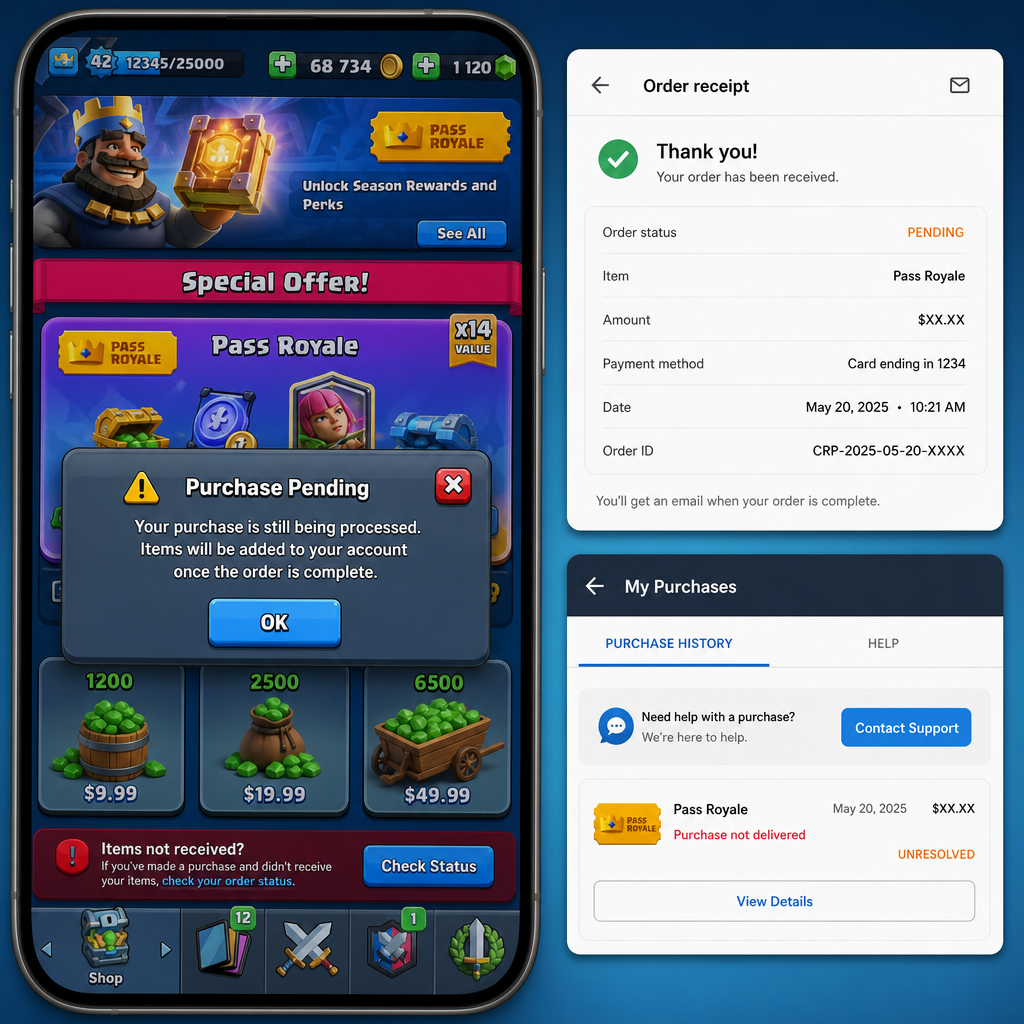
Do not buy again yet. A delayed recharge can still finish after a few minutes, especially if the order is stuck between the payment provider, the top-up platform, and the game server. A second purchase can create a duplicate charge and make the first order harder to trace.
The cleanest move is to pause, collect the right details, and check the order status before escalating. You need to know whether the order is pending, failed, completed without delivery, or attached to the wrong player ID.
What Changed
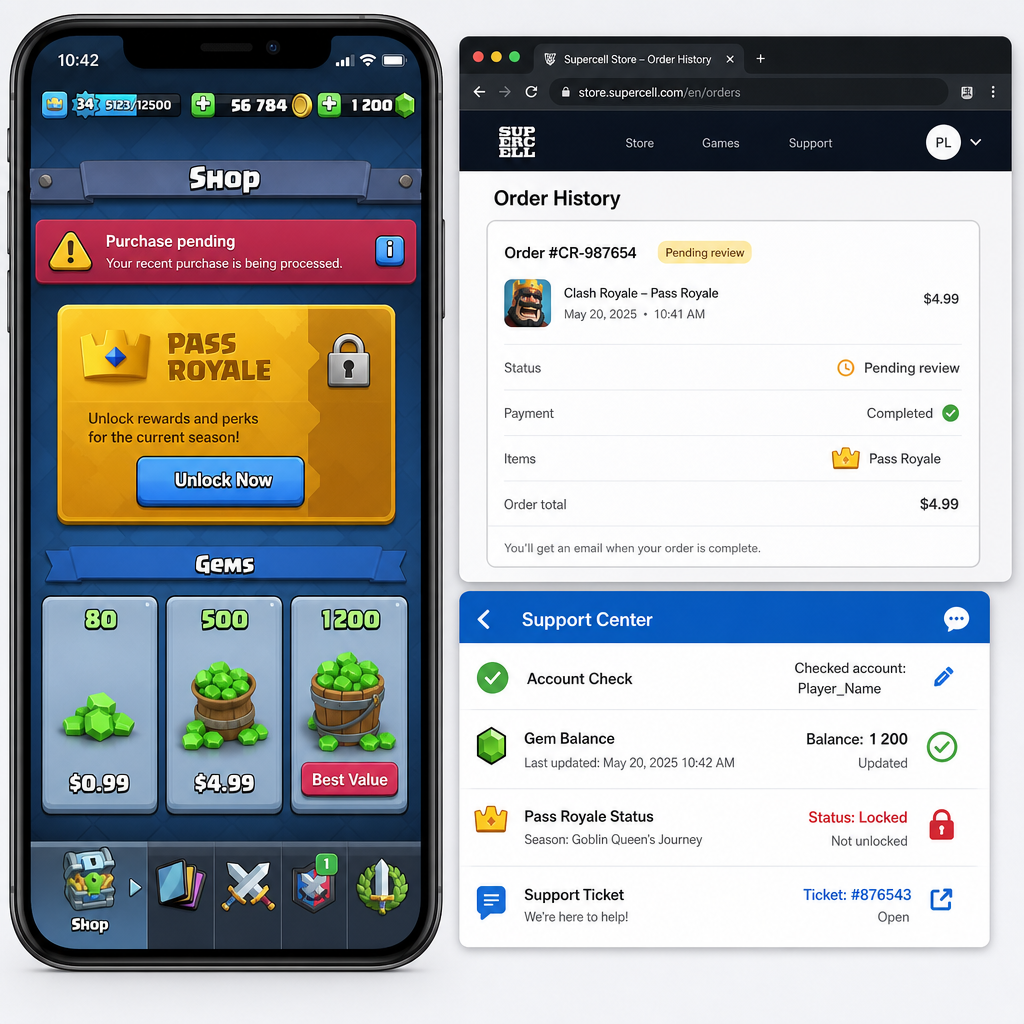
The first clue is usually obvious: the payment went through, but the Clash Royale account did not update. For gems, the balance at the top of the screen stays the same. For Pass Royale, the premium track remains locked, the pass banner still asks you to buy, or rewards that should be available cannot be claimed.
Look closely at what happened right after payment. Did your payment app show a successful charge? Did the store return you to Clash Royale normally? Did the top-up site show an order ID, invoice number, or pending message? These details matter because missing delivery does not always have the same cause.
A delivery delay usually means the payment was accepted, but the game has not credited the item yet. A pending order means the platform is still waiting for payment confirmation or fulfillment. A failed order should not deliver, though the payment may later be reversed depending on the provider. A completed order with no in-game item is the case you need to document most carefully.
For Clash Royale, the player ID is central to the lookup. It is not your player name, clan name, email address, or a tag typed from memory. You need the exact player tag from your in-game profile. One wrong character can point support to the wrong account or stop the order from matching at all.
Before assuming the purchase is lost, make sure you are in the right game account. A lot of delivery complaints come from switching devices, using a different Supercell ID, or opening a secondary account without noticing. If your trophies, clan, card levels, or display name look even slightly off, check the account first.
How to Stabilize the Issue
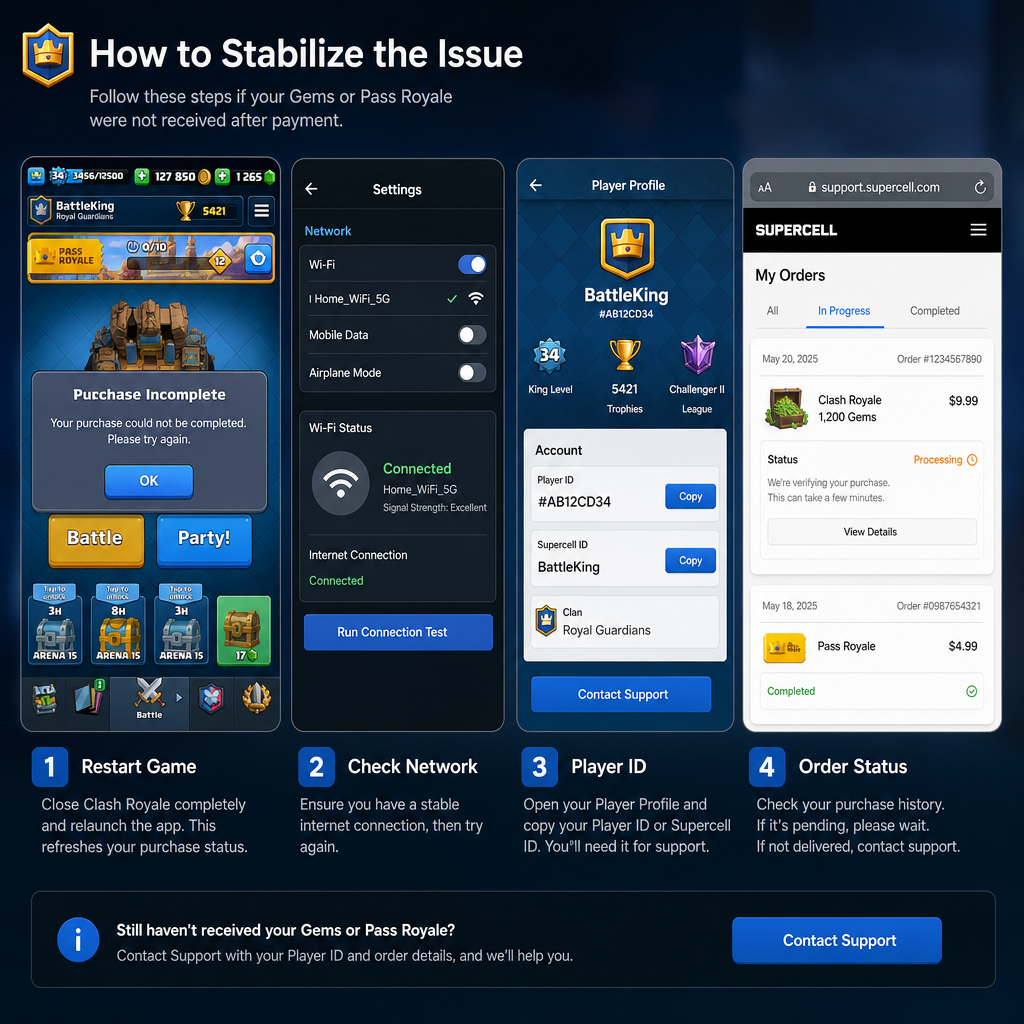
Start with screenshots before you change anything. Capture the payment confirmation, the order status page, the order ID, the purchase time, and your current gem balance or Pass Royale screen. If this turns into a support case, fresh screenshots carry more weight than a description written later.
Then close Clash Royale completely and reopen it after a short wait. Do not just switch apps. On mobile, remove it from the recent apps list, then launch it again. Sometimes the purchase only appears after the game refreshes the session. If your connection is weak, switch to stable Wi-Fi or mobile data and check again.
Next, verify your player ID inside Clash Royale. Open your profile and copy the player tag exactly, including the leading symbol if shown. If you used a top-up site, compare the player ID on the order with the player ID on the account you are viewing now. This is one of the easiest places to make a costly mistake.
After that, check the order status on the platform where you paid. Look for labels such as processing, pending, completed, failed, refunded, or under review. If the order is pending, do not open several support tickets right away. The order may still be moving through the system, and repeated requests can muddy the case.
If the order is marked completed, compare the completion time with the time you checked the game. Completed does not always mean the item appeared instantly on your screen. Wait a few minutes, reopen the game, and check the correct place again: gem balance for gems, Pass Royale banner and reward track for the pass.
For Pass Royale, also confirm the season. The pass is tied to the current Clash Royale season, so timing matters if you bought near a season change. Screenshot the season screen, pass status, and purchase confirmation. That helps support see whether the pass attached to the expected season or ran into a timing problem.
Do not uninstall the game as your first fix. Reinstalling usually does not force missing currency to arrive, and it can create a new problem if your account is not properly connected to Supercell ID. Only reinstall if your account is secured and the basic refresh steps have already failed.
A reasonable waiting window is often 10 to 30 minutes for normal delays, and longer during payment congestion, store maintenance, or heavy event traffic. If the platform gives a specific pending-order window, follow that. The point is not to wait blindly. Save the order ID, player ID, and proof while you wait.
If Recovery Fails
If the gems or Pass Royale still have not arrived after the normal delay window, stop refreshing and move to recovery. Your first job is to build a clean case summary. Support teams move faster when the details are complete and in order.
Prepare the Clash Royale player ID, player name, order ID, payment time, payment method, item purchased, amount paid, current order status, and screenshots. If the order came from a third-party top-up platform, include the platform account or receipt reference tied to that order. If it was an in-app purchase, keep the store receipt ready.
Use the order ID as the transaction reference. Use the player ID as the account reference. Do not rely only on messages like “my gems did not arrive” or “I bought the pass yesterday.” Those statements are understandable, but they are not enough to trace a purchase quickly.
If the top-up provider says the order is completed but the game account has no item, ask them to verify fulfillment against the exact player ID. That is different from asking whether payment succeeded. Payment success only proves money moved. Fulfillment verification checks whether the item was sent to the intended account.
If the platform says the order is still pending, ask for the expected completion or cancellation window. A pending order should eventually become completed, failed, refunded, or manually reviewed. It should not sit in a vague state forever. Keep the message factual and avoid opening new tickets unless the existing one has gone unanswered beyond the stated support time.
If the purchase was made directly through an app store, use the store purchase history and the game’s support flow. Be careful with refund requests while the order is still being checked. In some games and stores, refunding a delivered or partially delivered purchase can cause account restrictions, negative balances, or loss of access. Confirm delivery status first.
For Pass Royale, ask support to check the entitlement, not just currency. Gems are a balance item. Pass Royale is access. If the pass did not unlock, say that clearly so the case is not treated as a missing-gems report.
Risk Warnings
The biggest mistake is paying again before the first order is resolved. If the first order completes later, you may end up with an unwanted duplicate purchase. If both orders are pending, the support trail becomes harder to follow. Deal with the first order before creating another one.
The next big risk is the wrong player ID. Clash Royale player tags can look similar, and errors happen when players type from memory or copy from a blurry screenshot. If an order was delivered to a valid but wrong account, recovery may be difficult or impossible depending on the platform’s policy.
Do not share your Supercell ID login code, email password, device verification code, or full payment card details with anyone claiming they can “fix” the order. Real order troubleshooting should need the order ID, player ID, receipt proof, and purchase details. It should not require your account login credentials.
Be wary of unofficial sellers who cannot provide a usable order status page, receipt, or support channel. If there is no order ID lookup, no clear delivery status, and no way to verify the player ID submitted, you have very little protection when currency goes missing. A cheaper price is not worth losing both the payment and account safety.
Chargebacks are risky too. If you dispute a charge after an item has delivered, or while it is still being investigated, the payment provider, store, platform, or publisher may treat the transaction as reversed. That can lead to restrictions or future purchase problems. Use chargebacks only after normal support and refund routes have failed.
Before You Escalate
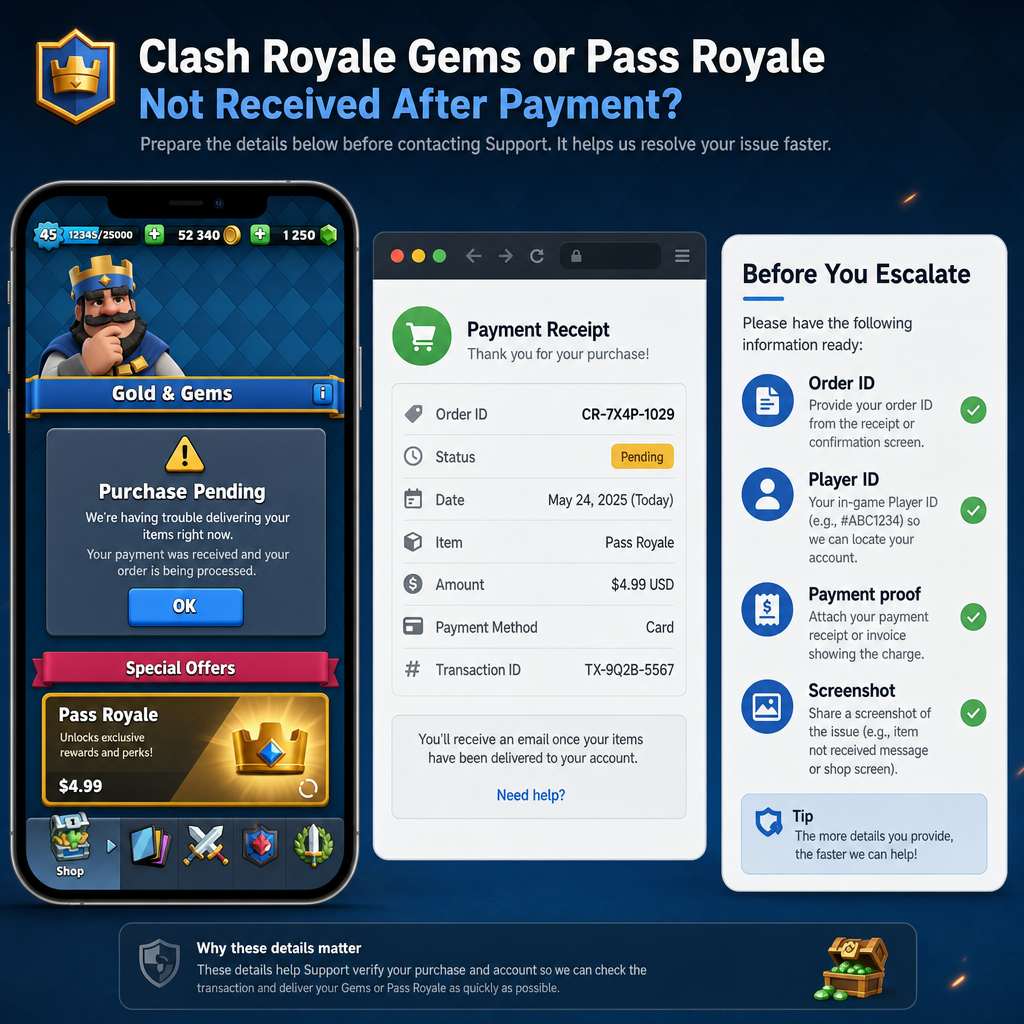
Before sending the issue to higher-level support, run one last checklist. Confirm the item is still missing on the correct account. Confirm the player ID on the order matches the player ID in Clash Royale. Confirm the latest order status and save a screenshot. Check whether the payment is posted, pending, reversed, or refunded in your payment app.
Write the support message in a compact format. For example: “I purchased Pass Royale for Clash Royale on this date and time. Payment was successful, but the pass did not unlock. My player ID is X, order ID is Y, and the order status currently shows completed. Screenshots are attached.” That gives support a direct path to investigate.
If the order status says pending, do not write as if it were already completed. Ask whether the pending order is waiting for payment confirmation, manual review, or game fulfillment. That distinction helps the case reach the right queue.
If the order status says failed but the payment app shows money deducted, ask whether the amount is an authorization hold or a completed charge. Some payment methods show a temporary deduction before a failed order is released. The release time may depend on the bank, wallet, or payment provider, not Clash Royale or the top-up platform.
Keep communication in one thread where possible. Multiple tickets for the same delayed recharge often create confusion because each agent may see only part of the story. One organized thread with the order ID, player ID, screenshots, and current status is stronger than several scattered messages.
FAQ
How long should I wait for Clash Royale gems or Pass Royale to arrive?
Many successful orders deliver quickly, but short delays happen. Wait at least 10 to 30 minutes while checking the order status. If the platform lists a longer pending-order window, follow that before escalating.
Where do I find my Clash Royale player ID?
Open Clash Royale and check your in-game profile. The player tag shown there is the ID you should use for order troubleshooting. Copy it exactly, including symbols, letters, and numbers.
What if my order status is completed but the currency is missing?
Save screenshots of the completed order, payment proof, and your current in-game balance. Contact the seller or platform and ask them to verify fulfillment against your exact player ID and order ID.
Can I buy again while the first order is pending?
It is better not to. A second purchase can create duplicate charges or complicate support review. Resolve the pending order first unless the platform clearly confirms it failed or was canceled.
Why did Pass Royale not unlock even though payment succeeded?
Payment success does not always mean the pass entitlement reached the game account. The cause may be a delivery delay, wrong player ID, season timing issue, or fulfillment failure. Support should check pass access specifically, not only gem balance.
Should I request a refund immediately?
Not if the order is still pending or under review. First confirm whether the item delivered, failed, or is still processing. Refunds and disputes can create account or purchase complications if they are started too early.
What proof is most useful for support?
The strongest proof includes the order ID, player ID, payment receipt, purchase time, item name, current order status, and screenshots showing the missing gems or locked Pass Royale.
Bottom Line
A delayed Clash Royale recharge is annoying, but the recovery path is usually plain enough: confirm the account, check the player ID, save the order status, and do not place another order while the first one is unresolved.
If the item still does not appear, escalate with evidence instead of guesswork. The order ID tells support which transaction to inspect. The player ID tells them which Clash Royale account should have received the gems or Pass Royale. If those two details are accurate, a legitimate delivery delay is much easier to trace.
The safest approach is patient but firm. Document the issue, check the status, ask for fulfillment verification, and move to refund or higher escalation only when the order has clearly failed or support cannot resolve it within the stated window.