

You try to recharge Honor of Kings, approve the payment, and then nothing looks right. The token balance does not change. Your wallet may show money deducted. The store may say the payment failed. Or the game may throw a billing error after the transaction already went through.
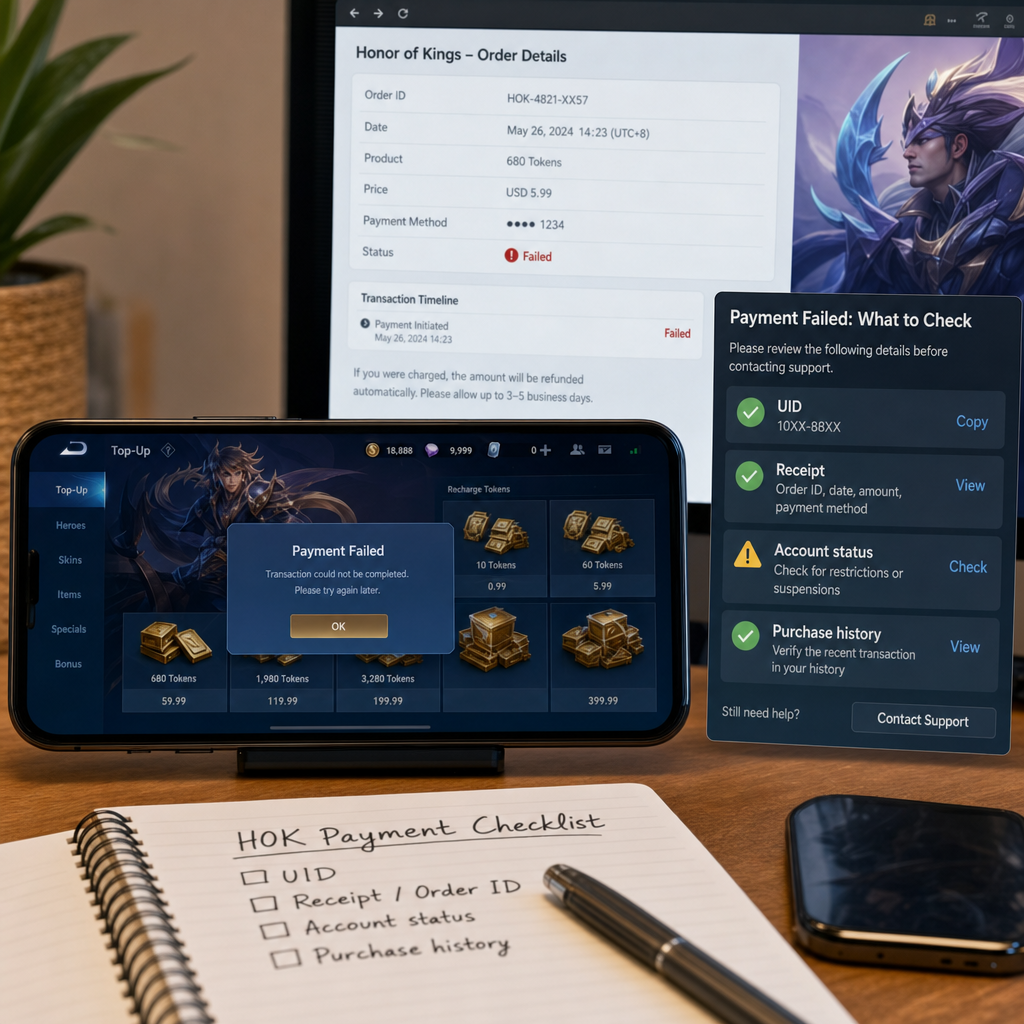
Do not keep tapping recharge. That is the easiest way to turn one unclear order into three confusing ones. Most billing problems can be traced, but only if you pause, check the actual payment status, and save the right proof before the order history gets messy.
The practical goal is simple: confirm what happened, tie the payment to the correct UID, and collect enough receipt detail for the platform, payment provider, or Honor of Kings support team to investigate.
What Changed
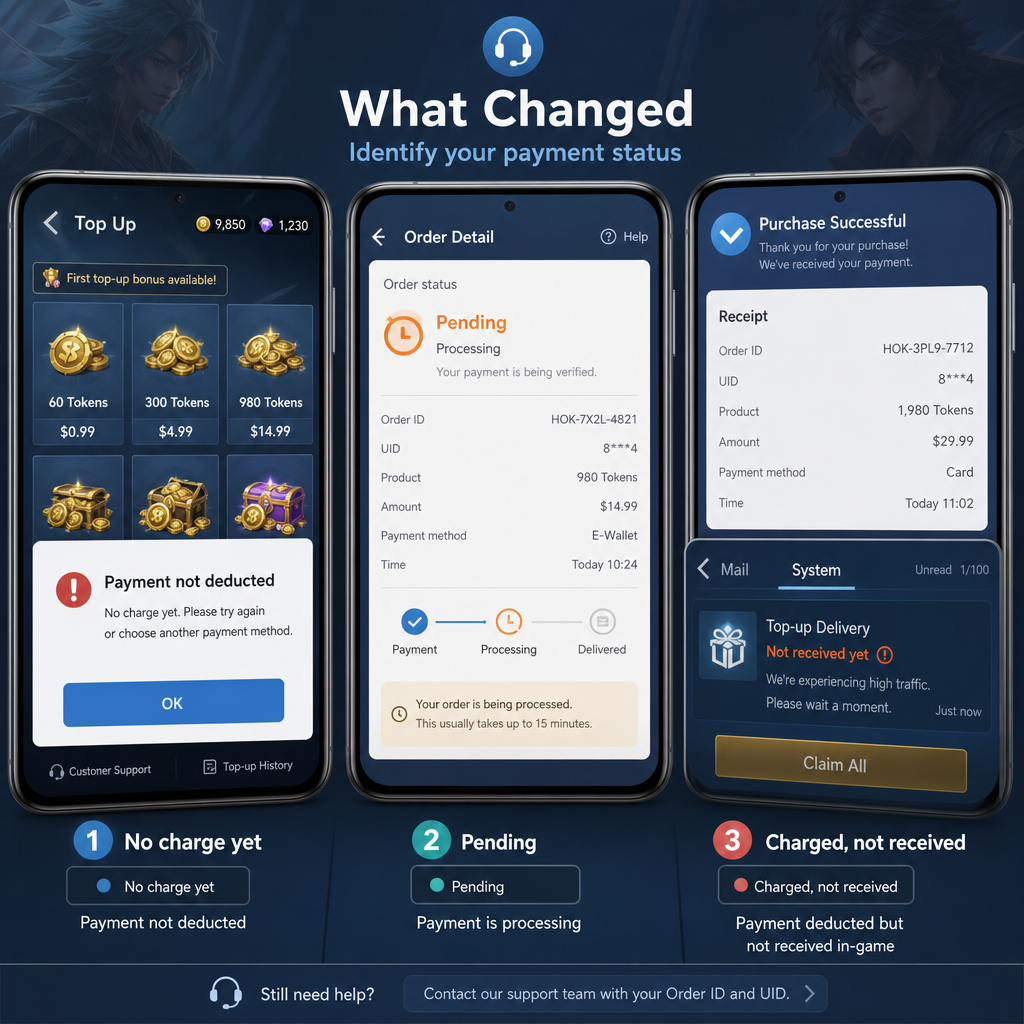
Start with the exact change you noticed. A recharge error is not always the same as a failed payment, and support teams will not treat every case the same way.
The cleanest case is a failed token purchase where no money left your account. You saw a payment failed notice, received no tokens, and your bank or wallet shows no completed charge. That is usually a failed transaction, not a missing-delivery issue. You may only need to wait a few minutes, restart the game, check that your card or wallet is active, and try again later.
The more serious case is money deducted but no HOK tokens received. Then the payment status matters. Was it completed, pending, processing, or only temporarily held? Some banks and wallets show a deduction immediately even when the merchant has not captured the funds. Pending authorizations often reverse on their own, though the timing depends on the provider.
There is also delayed delivery. The game may show a billing error while the app store, wallet, or payment channel later marks the purchase successful. Do not assume the recharge is gone. Token delivery can lag because of server load, store verification delays, regional routing, or account sync problems.
Check the account too. Are you still logged into the same Honor of Kings account? Did you switch login methods, region, server, or device? A successful recharge on the wrong account can look like a failed top-up from your main profile. This is where the UID matters. It is the stable account identifier support uses to match a receipt to a player profile.
Before doing anything else, write down the purchase time, top-up amount, payment method, device used, and the UID shown inside the game. Those details are harder to reconstruct after several more purchase attempts.
How to Stabilize the Issue
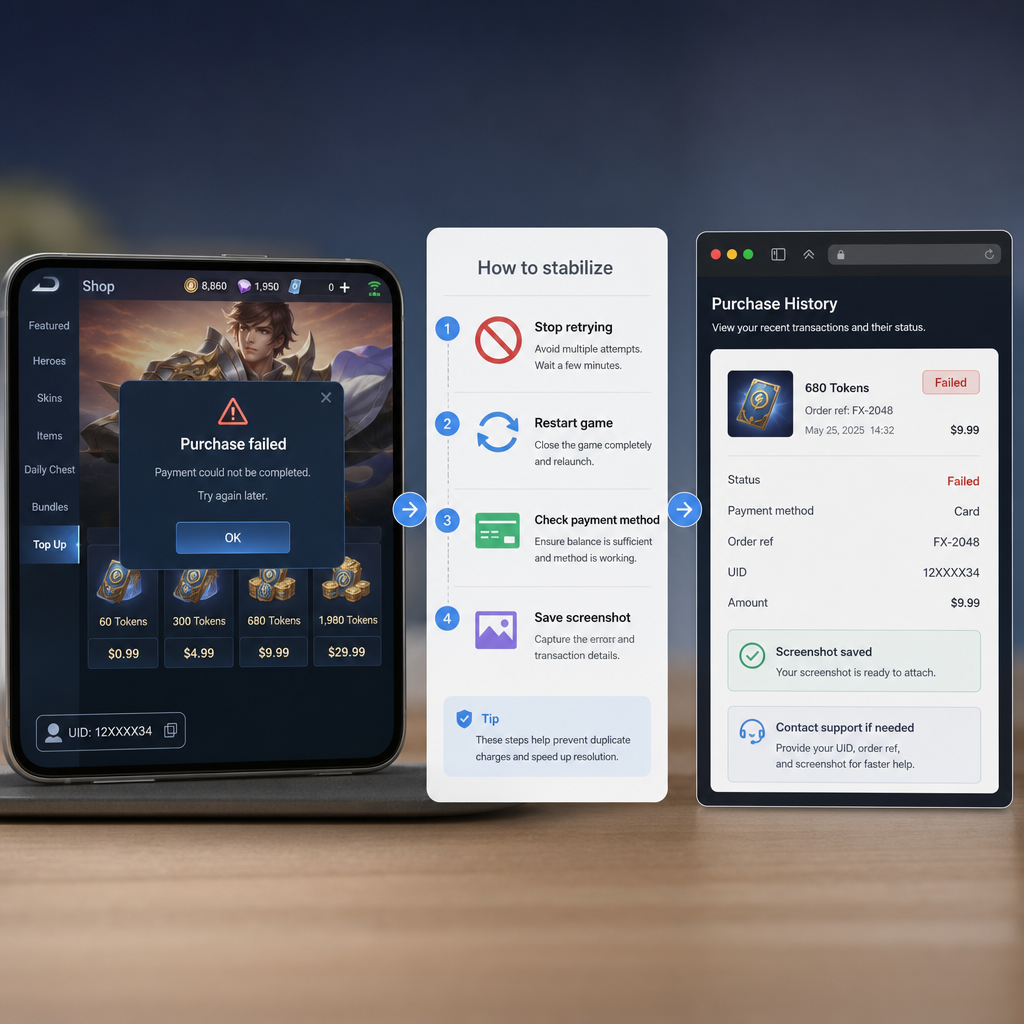
First rule: stop making repeat purchases until the original transaction status is clear. Multiple attempts can create overlapping pending holds, duplicate receipts, and a messy order history. If one later completes, you may receive more tokens than intended or trigger a refund review.
Next, fully close Honor of Kings and reopen it. Do not just switch apps. Force-close the game, wait briefly, then launch it again on a stable connection. Open the token or recharge page and check whether the balance refreshes. If possible, avoid bouncing between mobile data and Wi-Fi during this check, because network changes can interrupt account sync.
Now check the payment channel outside the game. If you paid through an app store, open that store account’s purchase history and look for the Honor of Kings order. If you used a wallet, carrier billing, bank card, or third-party recharge channel, check its transaction history. Look for clear status wording: paid, completed, pending, failed, canceled, refunded, or processing.
If the provider says the payment failed and there is no deduction, wait a little and try again later on a stable connection. If the provider says pending, do not rush into a dispute. Pending does not always mean the merchant has your money. Many failed payments create temporary authorizations that drop off after the provider’s clearing window.
If the provider says completed but the tokens are missing, start collecting proof. Take screenshots of your Honor of Kings UID, current token balance, any recharge error screen, and the payment receipt. Make sure dates, amounts, order numbers, and currency are visible where available. A cropped screenshot that only says “payment successful” without an order ID is weak evidence.
Then check whether the receipt and game account line up. A strong billing packet includes your UID, character name if visible, server or region if applicable, purchase amount, token package name, exact transaction time with timezone, order number, payment method, and screenshots. If the receipt came from an app store, keep the store account email or masked account identifier available. Do not put full card numbers into a support form.
Finally, allow a reasonable delivery window. Many small app purchases arrive within minutes, but delays happen. If the store says completed and the tokens still do not appear after a sensible wait, escalate with a clean timeline.
If Recovery Fails
If the payment is confirmed completed and the tokens are still missing, escalation is the next step. A good escalation is not long. It is complete.
Prepare a short case summary: “I attempted to recharge Honor of Kings tokens on [date and time]. The payment provider shows the transaction as completed, but the tokens were not added to UID [number]. I have attached the receipt, order ID, current balance screenshot, and recharge error screenshot.” That gives the reviewer the problem in one pass.
Copy your UID exactly from the game. Do not type it from memory. One wrong digit can send the investigation to the wrong account. If Honor of Kings shows both a UID and a character ID, capture both. If the recharge used a regional store account, include the region because payment routing can vary by market.
For receipts, keep the original format whenever possible. A forwarded email receipt, store purchase record, wallet transaction detail screen, or bank transaction page is stronger than a screenshot of a notification. Notifications are often incomplete and may not include the merchant order ID.
If you used a top-up website or third-party seller, save that order number too. Be careful, though. Game support may not be able to verify unsupported sellers, and unauthorized channels can carry extra risk. You may need to work through the seller’s support first while keeping your in-game UID and transaction proof ready.
If the payment provider says the transaction failed but your bank account still shows a deduction, ask whether it is a pending authorization or a captured charge. The distinction matters. A pending authorization usually cannot be fixed by game support because the game may never have received the funds. A captured charge with no token delivery is the stronger case for game-side investigation.
Risk Warnings
Do not share your login password, verification code, full card number, or full government ID with anyone claiming they can fix the recharge manually. Real billing troubleshooting relies on order IDs, receipts, UID, and official account records. Anyone asking for your password is trying to take the account, not fix a billing error.
Avoid chargebacks as your first move unless you understand the consequences. Chargebacks can reverse a payment, but they can also trigger account restrictions, negative balance reviews, or purchase locks depending on platform rules. If you received tokens and then dispute the payment, the account may be flagged. If you did not receive tokens, it is still usually better to escalate with proof before forcing a bank dispute.
Do not edit receipts except to hide sensitive payment details. If you blur anything, limit it to private data such as full card numbers, billing address, or unrelated transactions. Leave the order ID, date, merchant name, amount, and currency visible. Over-edited screenshots slow verification and can look suspicious.
Be careful with repeated failed payments. Several rapid attempts can trigger fraud filters from your bank, wallet, app store, or payment processor. Once that happens, legitimate purchases may fail for a while. If you keep seeing payment failed notices, pause and check with the payment provider instead of continuing inside the game.
Also check for regional mismatch issues. If your game account, store region, payment method, and currency do not align, the payment may be blocked or delayed. This is common for players who changed country settings, use multiple store accounts, travel often, or play across regions.
Before You Escalate
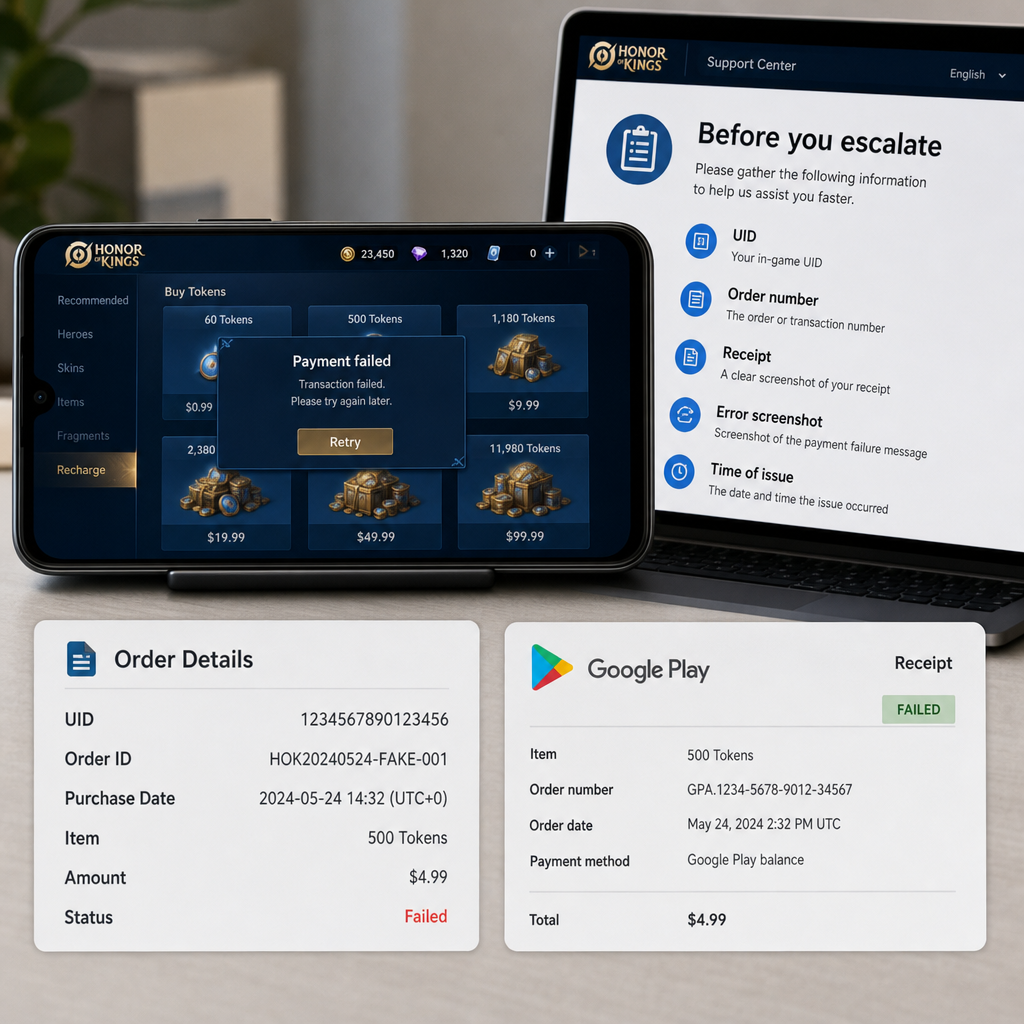
Before contacting support, build a clean evidence folder. Include a screenshot of your Honor of Kings UID, a screenshot of the token balance after the failed or missing recharge, the payment receipt, the order detail page, and any visible error message. If the game displayed a billing error code, capture it exactly.
Write the timeline in order. Do not begin with conclusions like “the game stole my money.” Start with the transaction. Include when you tapped recharge, what package you selected, what payment method you used, what message appeared, what your payment provider now shows, and whether tokens arrived later.
Use one support route at a time when possible. If you contact the app store, payment provider, and game support all at once with conflicting requests, you can create delays. A practical order is: verify payment status with the payment channel, wait for pending holds if needed, then contact game support if the payment completed but tokens are missing.
When filling out a support form, match names and amounts exactly. If your receipt shows a specific token package or local currency amount, use that wording. Do not convert the price into another currency unless asked. Support will search by actual transaction data, not a rough estimate.
Keep the tone factual. Billing teams handle many failed-payment and missing-delivery cases. A clear report is easier to solve than an angry one. A useful report says what happened, proves payment status, identifies the account by UID, and asks for token delivery or transaction verification.
After submitting, save the ticket number. If you need to follow up, reply to the existing case instead of opening several new ones. Multiple tickets for the same billing issue can split the evidence and slow the review.
FAQ
Why did Honor of Kings show payment failed but my bank still shows a charge?
It may be a pending authorization, not a completed charge. Banks and wallets can temporarily reserve funds even when the merchant side fails. Check whether the transaction is pending or completed before escalating to game support.
What proof do I need for missing HOK tokens?
You need your UID, current token balance screenshot, payment receipt, order ID, purchase amount, time and date, payment method, and any recharge error or billing error message. The order ID and UID are the most important matching details.
Should I try the recharge again after a payment failed message?
Only if your payment provider clearly shows the first attempt failed and no funds are pending or completed. If there is any pending or completed transaction, wait and investigate first to avoid duplicate purchases.
How long should I wait for tokens to arrive?
Many successful recharges arrive quickly, but delays can happen during payment verification or server sync. If the payment is completed and tokens still do not appear after a reasonable waiting period, prepare your receipt and contact support.
Can support find my order without a receipt?
Sometimes, but it is much harder. Your UID helps identify the account, while the receipt and order ID help locate the transaction. Without a receipt, support may ask for more proof from your payment provider.
Is it safe to send screenshots of my payment receipt?
Yes, as long as you keep the order ID, merchant, date, amount, and currency visible while hiding sensitive information such as full card numbers, full billing address, and unrelated transactions.
What if I used the wrong Honor of Kings account?
Capture the UID of the account that received or should have received the tokens and compare it with the account you were logged into during purchase. Support may not be able to move purchases freely, but accurate UID details are still needed for review.
Bottom Line
A failed Honor of Kings recharge is annoying, but the next move should be boring and methodical. Confirm whether the payment failed, stayed pending, or completed. Stop repeat attempts until you know which one it is. Then collect the UID, receipt, order ID, token balance, and error screenshots before opening a case.
The strongest billing reports are calm, specific, and traceable. If your money was not captured, the payment provider is usually the right place to check first. If the payment completed and the HOK tokens did not arrive, Honor of Kings support needs a clean receipt packet tied to the correct UID. That is what turns a vague complaint into a case someone can actually investigate.