

You paid for Lunites, the charge went through, and your account still looks wrong. No currency, no clear update, maybe just that sinking feeling that the order landed on the wrong character. Annoying, but not unusual.
Before you buy again or file a rushed support ticket, stop and check the account details tied to the order. In Wuthering Waves, most delivery problems trace back to three things: the UID, the selected server, and the account region attached to that character. These mistakes show up a lot when players use more than one login, switch devices, or keep characters on different servers.
The safest approach is to work through the basics in order. That helps you rule out the common errors first and avoids making the mess worse with a duplicate purchase or a report tied to the wrong account.
It also helps to separate a true delivery failure from a simple delay. A completed payment does not always mean instant in-game credit, and a missing balance does not always mean the transaction is lost. If you stay methodical and compare the purchase details against the exact character you meant to fund, you can usually tell whether the issue is temporary, clerical, or something that really needs escalation.
Symptom Check
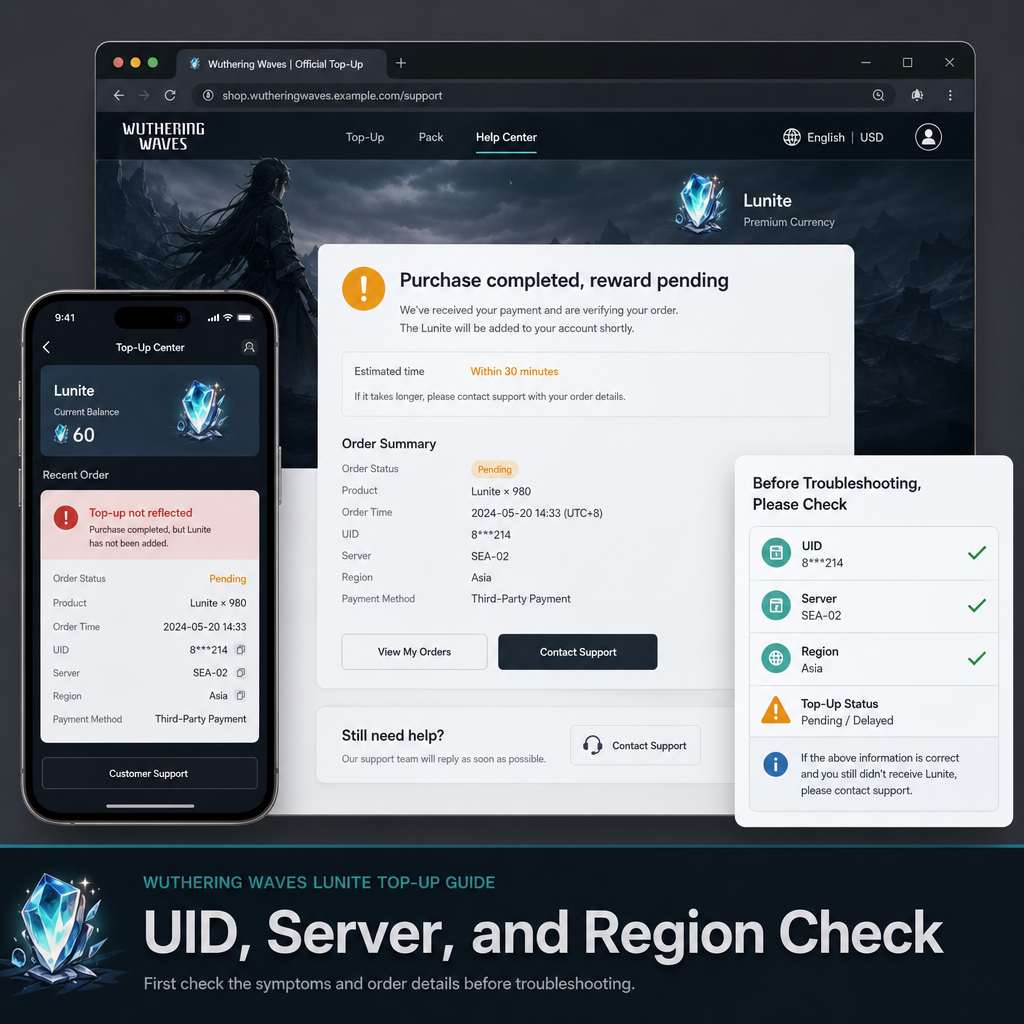
Start with the exact issue you are seeing. That sounds obvious, but players often skip it and assume every failed-looking order is the same.
If the payment is marked completed but Lunites are missing, you may be dealing with a delivery delay or an account mismatch. If the order is still pending, the problem may be on the payment side and not the game account at all. If Lunites showed up on a different character than expected, that usually points straight to a UID or server selection error.
Take a screenshot of the payment confirmation, the in-game balance, and the character account page before you do anything else. It gives you a clean record if you need support later.
Also note the exact time of purchase and whether you were using the game client, a mobile store, or a top-up page. That context matters because each route can have a slightly different processing timeline. A charge that looks stuck for five minutes may still be inside a normal delay window, while a charge that has not reflected after a longer period deserves closer checking.
One more useful check is to log fully out and back in after confirming you are on the intended server. Sometimes players stay on the correct account but view the wrong character slot or a different server tab. Refreshing the session is not a magic fix, but it can rule out a stale display before you assume the order failed.
What Usually Causes This
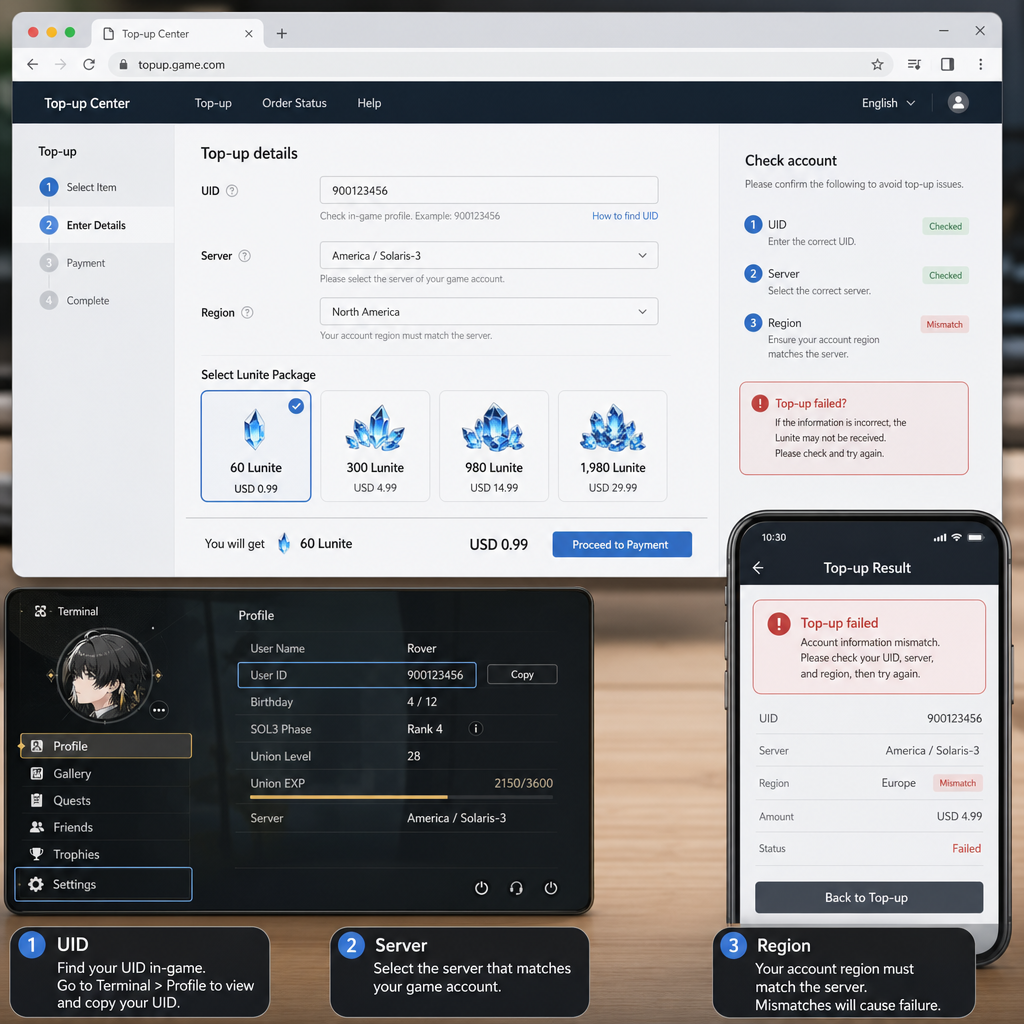
The most common cause is a wrong UID. One digit off is enough to send the top-up somewhere else, especially if the order was placed manually and not through the logged-in game account.
Server choice is another frequent problem. A player may have characters on more than one server, or may log in from a different device and not notice the selected server changed. The account can look familiar while still pointing to the wrong character slot.
Region confusion also causes trouble. In practice, this usually happens when the payment platform, account setup, and character region do not line up the way the player assumed. The purchase may not fail outright, but delivery can be delayed or tied to a different account context than expected.
Sometimes the payment is simply slower than usual. That happens too. Still, it is smarter to verify UID, server, and region first before treating it as a pure delay.
Another regular cause is account switching during normal play. Many players bind multiple login methods, test reroll accounts, or play on both mobile and PC. If you ordered while signed into one account context and then checked a different one afterward, the top-up can appear missing even though it was delivered correctly to another profile.
There is also the possibility of reading the receipt too quickly. A payment confirmation from your card, wallet, or app store only proves that the transaction was initiated or captured. It does not automatically confirm that the game item has been applied to the specific character you expected. That is why receipt details and character details need to be compared directly instead of assumed to match.
Fix Sequence
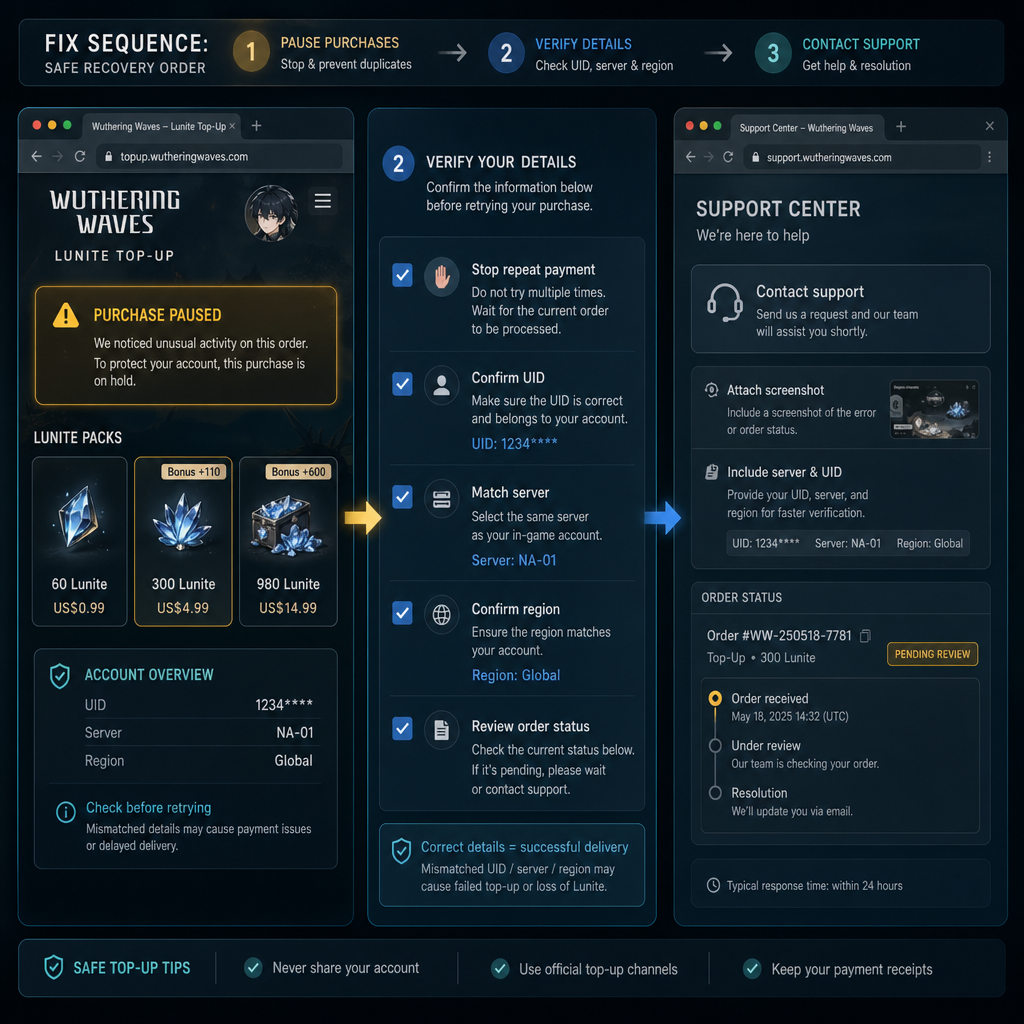
First, do not place a second top-up right away. A duplicate order creates a bigger headache than a short wait.
Next, check the UID shown on the target character in-game and compare it against the UID used for the purchase. Do not rely on memory. Match the numbers directly.
After that, confirm the server on that character. Make sure it is the same server selected during the order process. If you play across multiple servers, check each one before assuming the Lunites never arrived.
Then review the account region tied to the character and payment context. You are looking for mismatches, not obscure technical faults. If you used a different login method, changed devices, or switched between accounts recently, slow down and confirm each detail.
If all three details are correct, give the order a reasonable short window to update. If nothing changes, contact the seller or payment support with the UID, server, order receipt, time of purchase, and screenshots. Clear evidence matters more than a long explanation.
A practical order of operations helps. Start inside the game and write down the exact UID and server of the character you intended to top up. Then open your purchase confirmation and compare every visible field. If the order source included a typed UID, inspect each digit. If the top-up was done through a login-based flow instead, verify which account login was active at checkout.
After that, restart the app or relog once, then recheck the balance. If you have characters on multiple servers under the same account, open each server one by one. This step sounds basic, but it catches a surprising number of mistakes because players often remember the account name and forget that the server determines where the purchased currency appears.
If your details do not match, stop there and document the mismatch clearly. If they do match, wait a short additional period and keep all evidence in one place. Your goal is to escalate once, with the right information, rather than send several incomplete reports that slow the process down.
Risk Warnings
The biggest risk is making the situation worse by panic-buying again. If the first order is only delayed, a second purchase can leave you with extra charges and a harder refund conversation. Always finish the basic verification steps before spending more.
Another risk is editing or guessing details when contacting support. If you are not sure whether you used a certain server or login method, say so plainly instead of filling the gap from memory. Inaccurate details can send support teams looking at the wrong account and extend the delay.
Be careful with screenshots and receipts as well. They are useful, but they often contain order numbers, account identifiers, and payment data. Share them only through official support channels or the original seller's proper contact process. Posting full receipts publicly is an unnecessary security risk.
A final warning: do not try random account changes just to see if the currency appears somewhere else. Rebinding accounts, switching regions repeatedly, or logging through several different methods in quick succession can make it harder to reconstruct what happened. Stable, documented checks are safer than frantic experimentation.
When Support Is Actually Needed
Support is usually needed after you have confirmed the UID, server, and region details, waited a reasonable short period, and still have no Lunites on the intended character. At that point, the problem is no longer just a routine self-check.
You should also escalate if the receipt shows one set of account details and your intended character clearly has another. That kind of mismatch may not be fixable from your side, especially if the order was processed against the wrong UID or wrong server selection. The sooner you submit clean evidence, the better.
If the payment is captured but the order status remains unclear for too long, support should review it. Include the transaction time, payment method, amount, account UID, selected server, and screenshots showing the current in-game balance. A short, factual timeline usually works better than a long complaint.
Support is also appropriate if you suspect the issue involves the store platform rather than the game itself, such as an app store charge with no corresponding order fulfillment. In that case, keep your request narrow: explain what was charged, what account it was meant for, and what you have already checked. That reduces back-and-forth and gives the agent what they need to investigate quickly.
FAQ
How long should I wait before assuming the Lunites are missing?
A short delay can be normal, so first verify UID, server, and region, then allow a reasonable brief window for the order to update. If nothing changes after that and your payment is clearly completed, gather screenshots and escalate.
Can Lunites appear on the wrong character?
Yes, if the purchase was tied to the wrong UID or server. This is one of the most common outcomes when players have multiple characters or accounts and complete the order too quickly.
What if my payment says completed but my in-game balance did not change?
That usually means either a delivery delay or an account-detail mismatch. Compare the receipt against the exact in-game UID and server before assuming the charge is lost.
Should I buy the same top-up again to test it?
No. A second purchase can create duplicate charges and make the support process harder. Verify the first order thoroughly before spending more.
What information should I send to support?
Send the order receipt, transaction time, amount, UID, server, current balance screenshots, and a brief explanation of what you already checked. Clear evidence is more useful than a long message.
Does changing devices cause top-up issues?
It can contribute to confusion, especially if a different login method or server selection was active on the new device. Device changes are not automatically the cause, but they are worth checking when the account context looks wrong.
Bottom Line
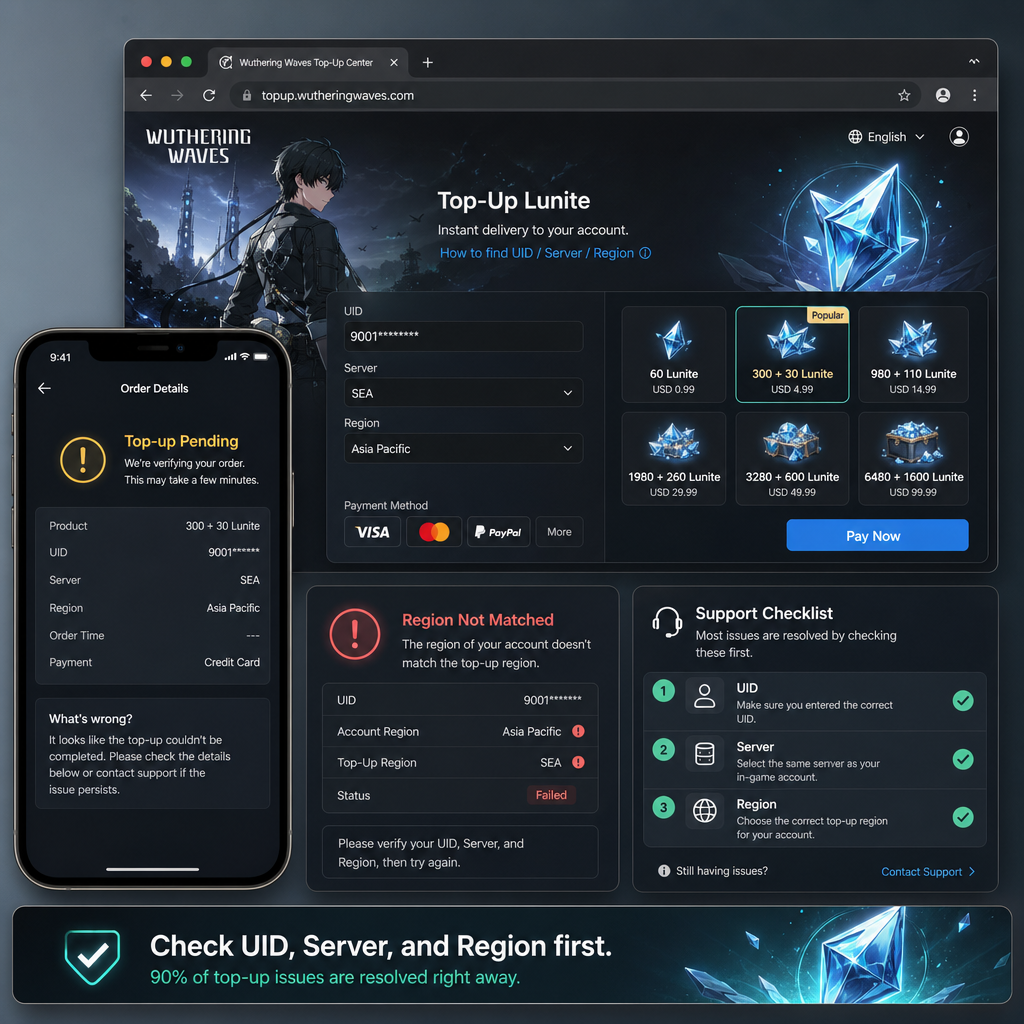
Most missing-Lunite cases are less dramatic than they first look. The practical check is the same almost every time: verify the UID, verify the server, verify the region, then wait briefly before escalating. That order keeps you from compounding a simple account-detail mistake with a second payment or a confused support request.
If you treat the problem as a checklist instead of an emergency, you give yourself the best chance of resolving it quickly. Confirm the target character, document the payment, avoid duplicate purchases, and contact support only after the basics are locked down. In most cases, that is the clearest path to finding where the top-up actually went.