

You paid for a Genshin Impact recharge, opened the game again, and the result does not match the receipt. Maybe the payment shows as successful, but the order is still pending or processing. Maybe the Genesis Crystals are not in your balance. If you bought Blessing of the Welkin Moon, the blessing may not look active, or the daily Primogem prompt may not appear when you expected it.
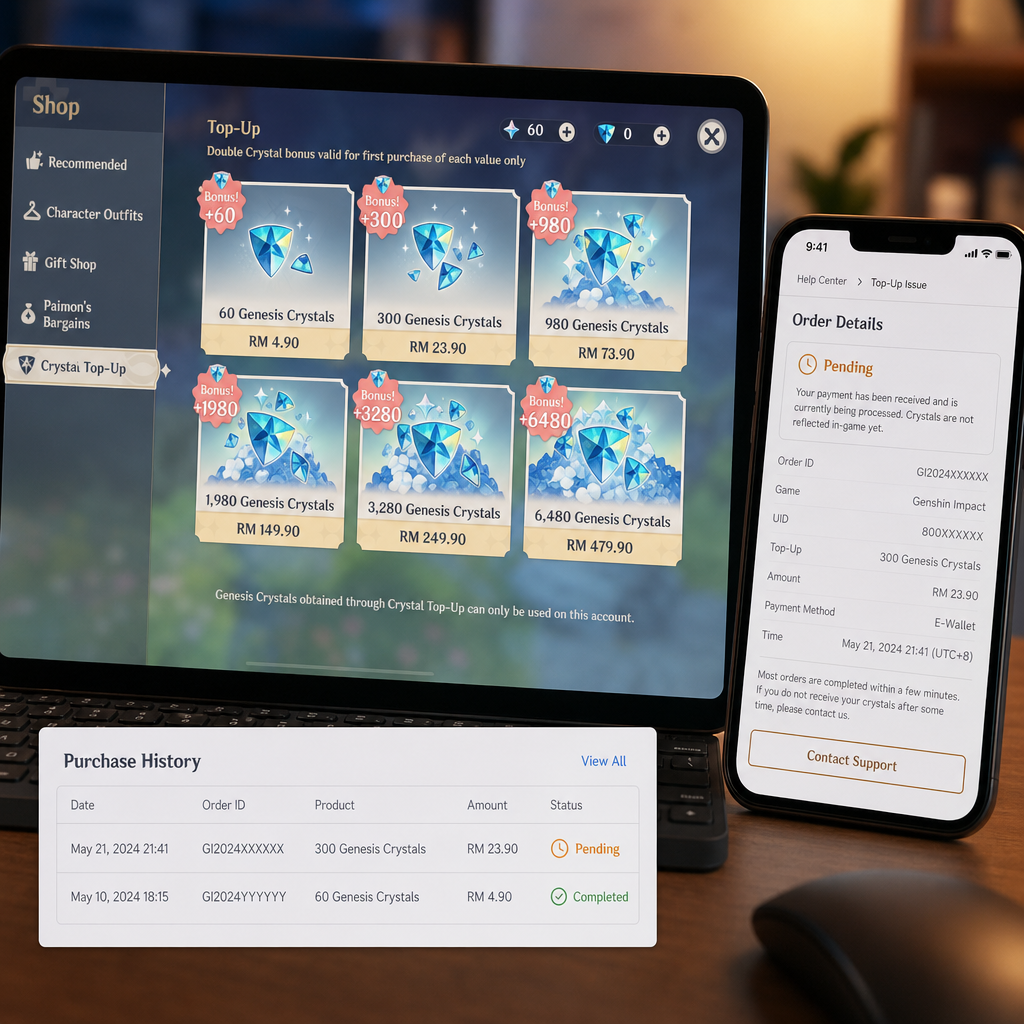
This is usually where players start refreshing, switching devices, or buying again. Don’t do that yet. A delayed recharge is not automatically a failed one, and a missing balance is not proof that the purchase vanished. First, keep the situation clean: confirm the account, confirm the server, read the order status, and avoid creating duplicate records.
Most missing Genesis Crystal or Welkin Moon cases come down to a small set of causes: wrong UID, wrong server, payment verification, platform-side delivery delay, client refresh, or an order that has not reached the delivery stage. Work through those before escalating.
What Changed
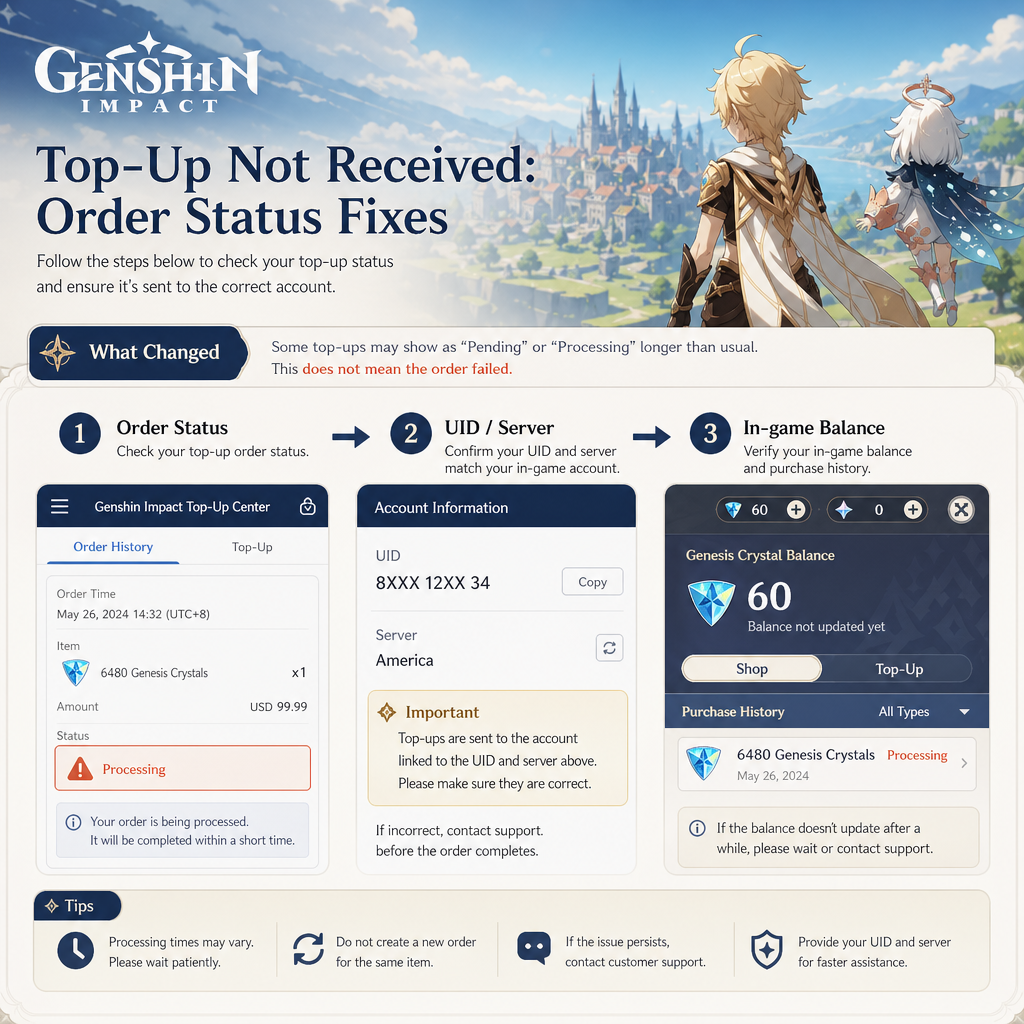
Start with the exact result after purchase. A Genesis Crystal top-up should increase the Genesis Crystal balance on the selected Genshin Impact account and server. A Welkin Moon purchase should activate or extend the blessing period on that same account, then provide daily Primogems according to login and reset rules.
The first warning sign is usually a gap between payment status and in-game result. Your bank, wallet, card app, or top-up site may show the payment as completed while the order page still says pending, processing, under review, or delivery delayed. In that state, the transaction may be paid but not fully delivered. That is different from an order marked completed where the seller says delivery succeeded but the game account shows nothing.
Sometimes the item appears on one device after not showing on another. Genshin Impact account data is server-side, but storefronts and clients can lag or cache old information briefly. You need to separate a real delivery failure from a display refresh problem.
Check the product type too. Genesis Crystals and Welkin Moon do not show up the same way. Crystals appear as a premium currency balance. Welkin is an account benefit with daily login claims. If you expected all Primogems instantly, it may look missing even when it is active. Open the in-game shop or blessing screen and see whether the remaining days changed.
The account identity matters most. Genshin Impact supports several login routes, including HoYoverse account, Apple, Google, PlayStation Network, and regional login options. If the purchase went to the wrong UID, wrong server, or a linked account you are not currently playing, the order may have been delivered correctly somewhere else. That is frustrating, but it is not the same issue as a delayed delivery.
How to Stabilize the Issue
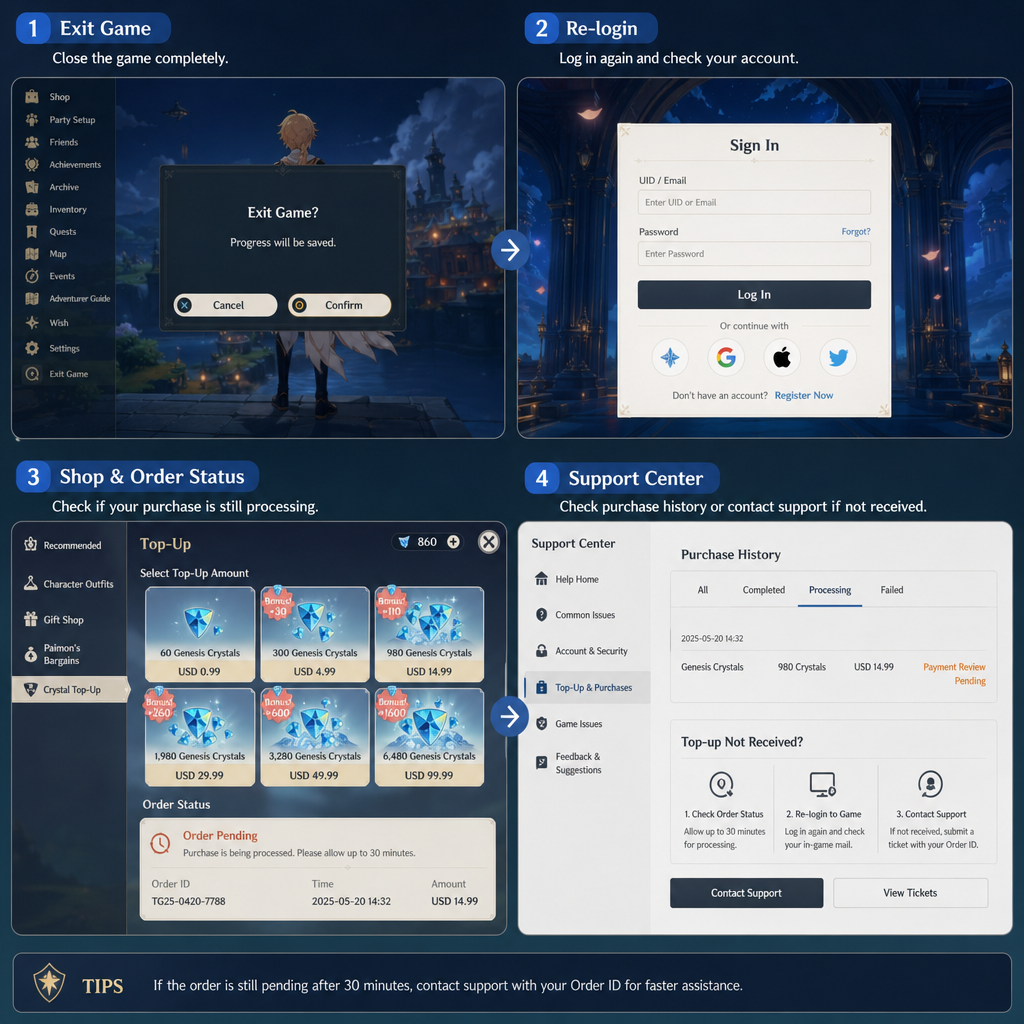
Do not place a second order right away. Duplicate purchases make the timeline harder to read, especially if one order is pending and a later one succeeds. Instead, write down the order number, product, purchase time, payment method, UID, server, and current order status. If you used a third-party top-up service, keep both the payment provider transaction ID and the platform order ID.
Next, force a clean account refresh. Fully close Genshin Impact rather than leaving it in the background. Reopen the game and log into the exact account used for the purchase. Confirm the UID in the profile area or lower corner, then confirm the server region. Players with America, Europe, Asia, or TW/HK/MO accounts can easily check the wrong server and mistake that for a delivery delay.
If you bought Genesis Crystals, open the shop and check the Genesis Crystal balance directly. Memory is not reliable here. If you bought Welkin Moon, check whether the blessing page shows an active duration or a higher remaining day count. If Welkin was already active, a new purchase usually extends the days instead of appearing as a separate item.
Now compare the order status wording. Pending usually means the platform has not finished processing the request. Processing or verifying often points to payment confirmation, fraud screening, routing, stock handling, or a provider-side delivery queue. Delivered, completed, or successful means the platform believes the item reached the account. Failed, refunded, canceled, or expired usually means it will not deliver unless support reopens or reprocesses it.
Give the order a reasonable delivery window before calling it failed. Many top-ups are fast, but delays happen during peak banners, payment checks, regional routing issues, maintenance, or heavy traffic after a character release. If the order page clearly says pending or processing, logging in over and over will not push it through.
Also check for payment holds. Some banks and wallets show a transaction as successful while it is still only authorized. The money may look deducted, but the merchant may not have final confirmation yet. The order can stay pending until the payment provider confirms or releases the hold. If the order later fails, the hold may reverse automatically, but timing depends on the payment method.
While the order is unresolved, avoid major account changes. Do not unlink accounts, switch login methods, change regions, start chargebacks, or ask several support channels to modify the same order at once. Keep one transaction tied to one account so it can be traced.
If Recovery Fails
If the order becomes completed but the Genesis Crystals or Welkin Moon still do not appear, stop waiting and start collecting proof. Take screenshots of the completed order page, payment receipt, in-game UID page, server details if visible, and the in-game shop or Welkin screen showing the missing balance or inactive blessing.
Before contacting support, compare the UID in the order details with the UID in your game client. A single wrong digit can explain the entire problem. If the UID is correct but the server is wrong, support may have limited options. Server mistakes are often handled differently from normal delivery delays because the item may already have been applied to another server profile.
If the order is still pending beyond the seller’s stated delivery window, ask for a status check. Keep it short: order number, UID, server, product, purchase time, payment method, current order status, and what is missing. That gives support enough to check whether the order is queued, stuck, rejected, or marked as delivered by the provider.
If support says the order was delivered, ask for the delivery timestamp and the target UID/server confirmation. Compare that with your own screenshots and login history. Sometimes the item arrived after the client refreshed. Sometimes Welkin extended existing days and was easy to miss. Sometimes the wrong account was used. And sometimes the delivery record needs manual review.
For Welkin Moon, pay close attention to daily reset timing. If the blessing activates after you already claimed the day’s reward, or near a regional reset boundary, the Primogem prompt may not appear exactly when you expected. Check the remaining days first, then track the next login after reset.
If the order failed or was canceled but payment was taken, request redelivery or refund handling under the platform’s policy. Do not assume both will happen automatically. Some providers need a ticket to match a failed top-up with a ca
ptured payment.
Risk Warnings
The biggest risk during a delayed recharge is panic-buying. If you place another order before the first one resolves, you may end up with two successful deliveries or two open disputes. This is especially risky during limited banners, when players rush to get wishes before the banner ends. If the first order is pending, wait until the platform confirms whether it will deliver, fail, or refund.
Chargebacks are another serious risk. If you request a bank chargeback while the recharge platform or game-side provider is still investigating, your account or payment profile may be flagged. In many games, disputed payments can lead to restrictions, negative balances, or future purchase blocks. Use chargebacks only after normal support and refund channels have failed, and understand the consequences first.
Be careful with unofficial sellers who ask for your login password, verification code, or full account access. A legitimate top-up flow should not require sensitive account credentials. UID-based top-ups may need your UID and server. They should not need your password. If someone asks you to disable security settings or share one-time codes, stop.
Watch for fake recovery messages too. After a public complaint, scammers may claim they can push a pending order, recover missing Genesis Crystals, or activate Welkin Moon manually. They cannot. Only the actual platform, payment provider, or official game support can verify delivery records. Do not send extra money to “unlock” a stuck order.
Screenshots can expose private details. If you share proof in public communities, hide your email, phone number, payment card details, and transaction references. Send full details only through the platform’s official support channel.
Before You Escalate
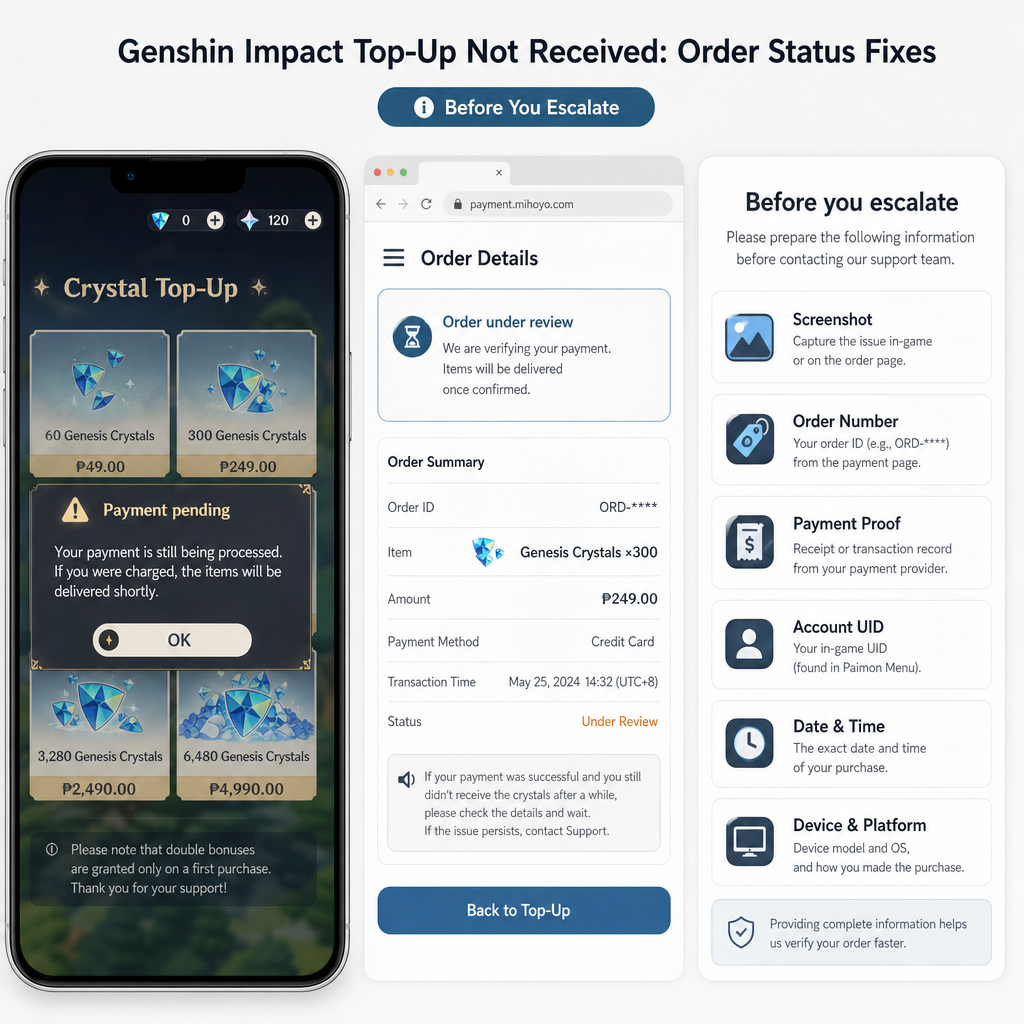
Escalation works best with a clean timeline. Prepare one message that gives the full story without clutter. Start with the product: Genesis Crystals or Blessing of the Welkin Moon. Then state the problem: currency missing, Welkin not active, order pending too long, or completed order not reflected in-game.
Include your UID and server exactly as shown in Genshin Impact. Add the order number, payment reference, purchase date and time, local time zone, amount paid, and current order status. If the order changed from pending to completed, mention when. If you already restarted the game, checked the correct server, and reviewed the Welkin screen, say that too. It helps avoid a loop of basic troubleshooting replies.
Attach screenshots in a logical order: receipt, order status, UID profile, then in-game balance or Welkin page. If the seller has a ticket form, use it instead of spreading the issue across chat, email, and social media. Scattered messages slow things down because no one has the full record.
If you are contacting the top-up platform, ask them to confirm the delivery result from their provider. If you are contacting game support, ask whether the UID received the specific product at the purchase time. Keep the request factual. The goal is not to prove how annoyed you are. The goal is to make the transaction traceable.
Set a follow-up window. If support says the order is under review, ask when you should check back. If they give a timeframe, wait for it unless the status changes. Reopening the same ticket every hour rarely speeds anything up and may push the case into a messier queue.
FAQ
Why are my Genesis Crystals not showing after payment?
The usual causes are a pending order, payment verification delay, wrong UID, wrong server, or a temporary client refresh issue. Check the order status first, then verify the UID and server inside Genshin Impact before escalating.
How long should a Genshin Impact recharge delay last?
Many orders deliver quickly, but delays can happen during peak traffic, payment review, maintenance, or provider queues. Use the delivery window shown by your recharge platform. If the order stays pending beyond that window, contact support with your order number and account details.
What does pending order mean for a top-up?
A pending order usually means the platform has not completed payment verification or delivery. The money may be authorized, but the Genesis Crystals or Welkin Moon may not be ready to appear in-game. Do not reorder until the pending status resolves.
Can Welkin Moon be active even if I did not get Primogems immediately?
Yes. Welkin Moon activation and daily Primogem claiming depend on account status and reset timing. Check the remaining blessing days in the shop. If the duration increased, the purchase likely applied even if the daily claim timing was not what you expected.
What should I do if the order says completed but nothing arrived?
Take screenshots of the completed order, payment receipt, UID, server, and in-game shop or Welkin page. Contact the recharge platform and ask them to confirm the delivery timestamp and target UID/server. If needed, contact official game support with the same evidence.
Should I request a chargeback for a missing top-up?
Not first. A chargeback can create account or payment complications. Start with the seller’s support process and request redelivery or refund handling. Consider a chargeback only after normal support options fail and you understand the risks.
Can support move a top-up from the wrong UID or server?
Not always. If the order was delivered to the wrong UID or server because the purchase details were entered incorrectly, recovery may be limited. That is why checking UID and server before payment matters.
Bottom Line
A Genshin Impact top-up that does not appear right away is stressful, but it is not automatically gone. Separate the three records: payment status, order status, and in-game delivery. Once you know which one is out of sync, the next move is easier.
If the order is pending, stay within the stated delivery window and do not buy again. If the order is completed but the currency or Welkin benefit is missing, gather evidence and ask for a delivery trace. If the UID or server is wrong, treat it as an account targeting problem rather than a normal delay. Genesis Crystals and Welkin Moon are tied to the checkout details, so small mistakes matter.
The strongest recovery cases have clean records: one order, one UID, one server, clear screenshots, and a simple timeline. Stabilize the issue first. Then escalate with proof. That gives support the best chance of seeing whether the recharge is queued, delivered, failed, or genuinely missing.