

You paid for a Kingshot recharge, went back into the game, and the balance still has not moved. The receipt may already be in your inbox. Your wallet or card may show the charge. That does not automatically mean the credits are lost, but it does mean you need to stop guessing and check where the order is stuck.
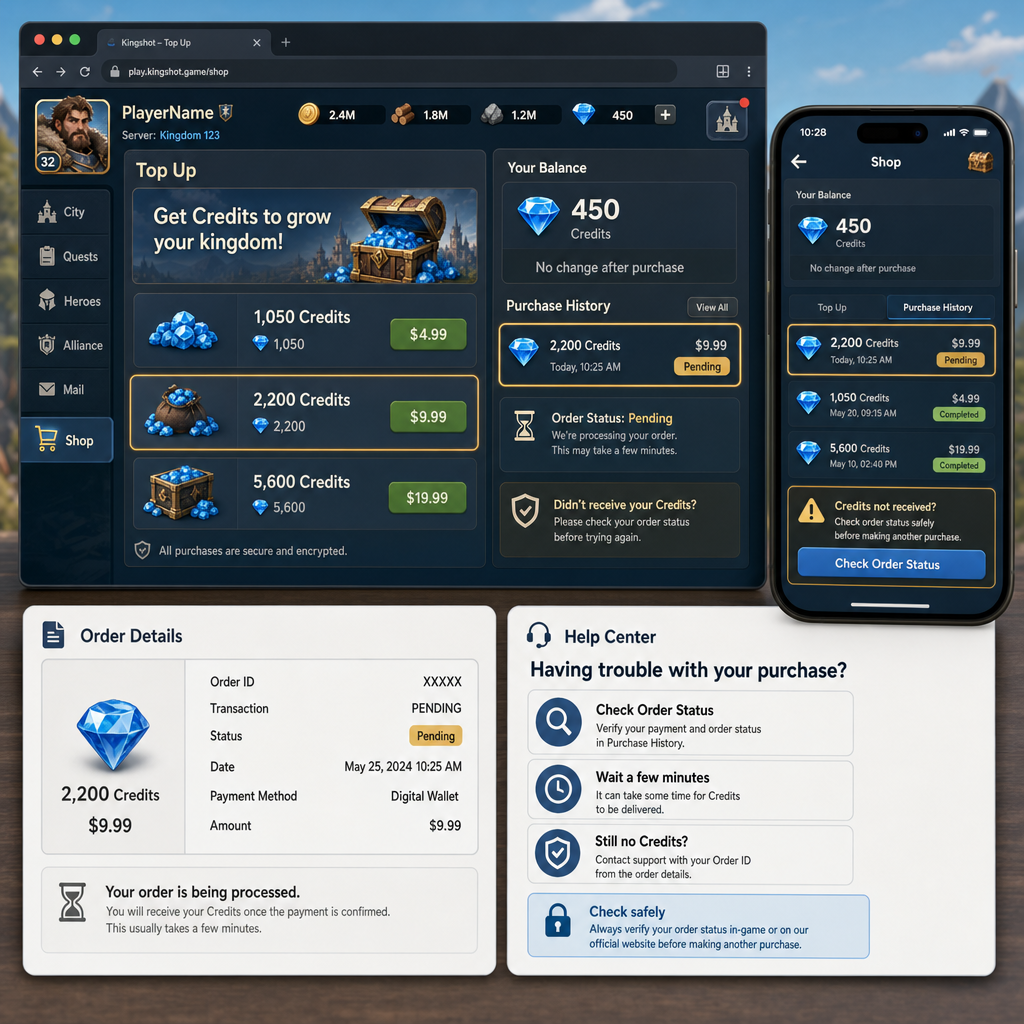
This is the point where players often make things worse. They restart the game ten times, buy the same pack again, or send support a screenshot that only shows an empty balance. A cleaner route is slower but safer: confirm the account, keep the evidence, check the order status with the full order ID, then decide whether it is a normal delay or a real delivery problem.
Short delays can happen with mobile game top-ups, especially during events, new server activity, payment reviews, or platform traffic. The important part is knowing what to check, what not to touch, and when the issue has moved beyond waiting.
What Changed
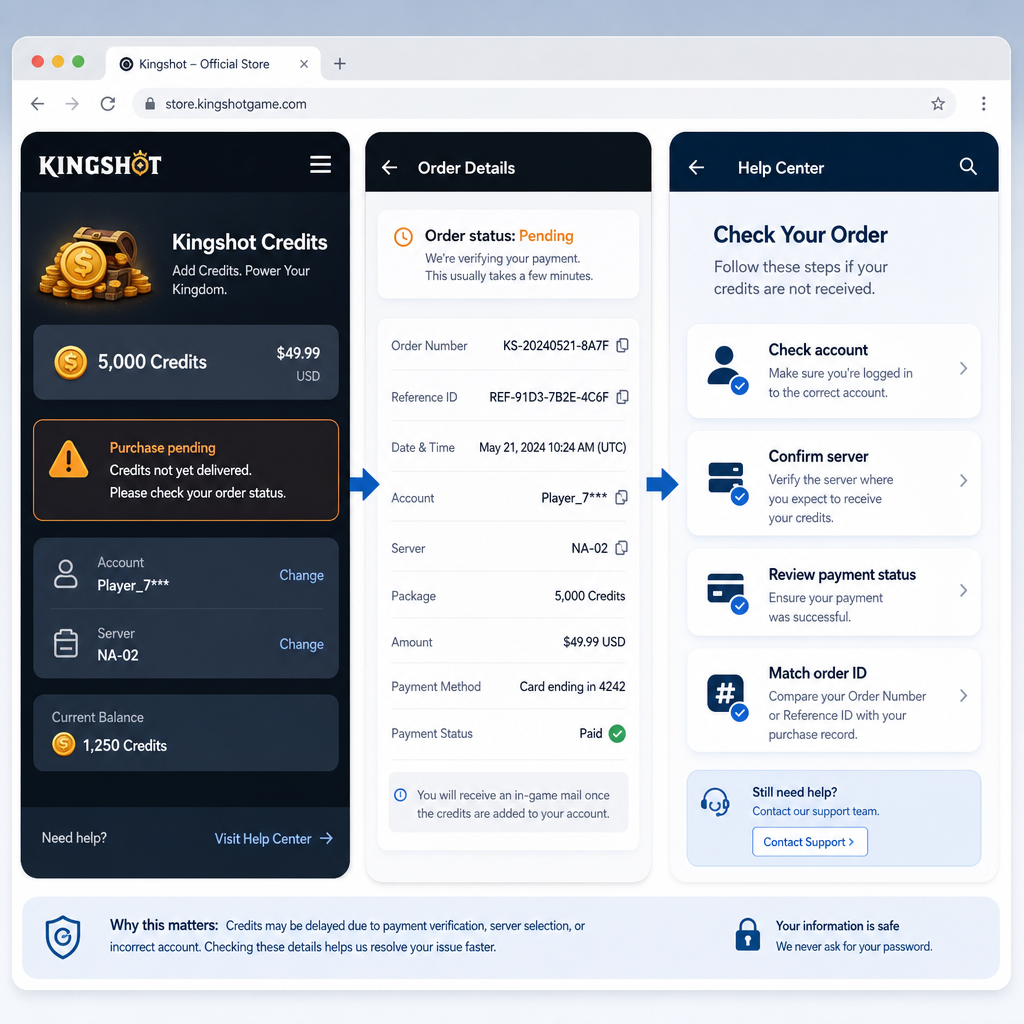
The obvious sign is that your Kingshot credits, gems, or recharge currency did not appear after payment. The useful detail is what changed around the account at the same time.
Separate the situation into three possibilities. The payment may still be processing, which means your bank, wallet, card provider, app store, or top-up platform has not fully cleared it. The payment may be complete while delivery to the game is still pending. That is the usual delayed recharge case: money moved, but the credits have not landed. Or the order may have failed, been reversed, or gone to the wrong account or server because of an input mistake.
Open Kingshot and confirm you are viewing the exact account you meant to recharge. Check the player ID, server, nickname, linked login method, and region if the game shows them. Players who move between guest login, social login, and platform login can easily end up checking the wrong profile. If you use more than one server or character, verify the recharge was intended for the one on-screen.
Then look for indirect signs of delivery. Check recharge history, VIP progress, event points, first-purchase rewards, bonus claim prompts, the shop, mailbox, bundle page, and currency area. Sometimes a reward updates before the balance refreshes. Sometimes the credits appear after opening the shop or restarting once. That does not mean you should keep tapping purchase. It only means the game client and server may not have refreshed at the same time.
The key detail is the order ID. Depending on where you paid, it may be called an order number, transaction ID, receipt number, merchant order, purchase ID, or reference number. Keep the full string exactly as shown. Do not shorten it, crop it, or send only the last few characters. For order troubleshooting, the complete ID is usually the fastest way for the seller or payment team to find the transaction.
How to Stabilize the Issue
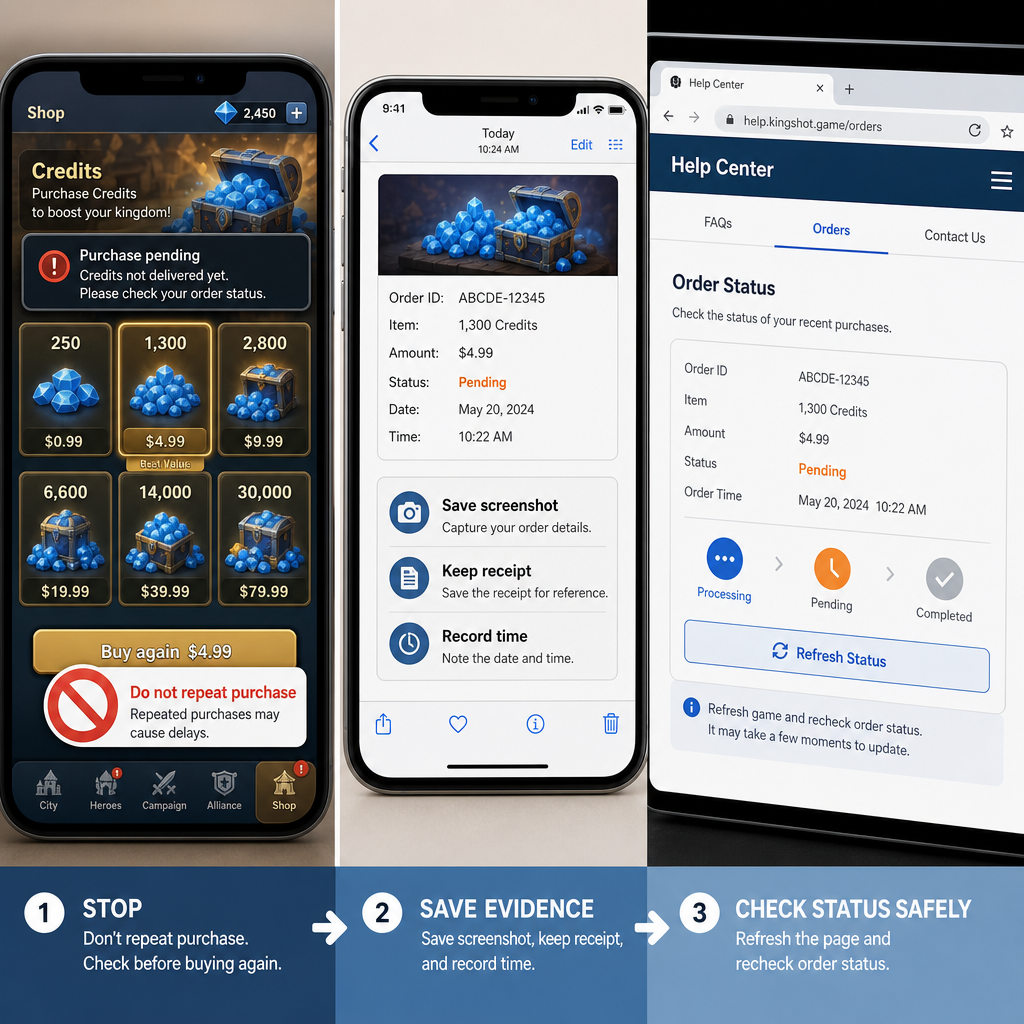
Before contacting support, keep the situation clean. Do not buy the same item again until you know the first order status. A second purchase can blur the records, especially if one order is delayed and the other delivers right away. It also gives support more to untangle.
Take a screenshot of your current Kingshot balance and the shop or recharge page. Capture the payment receipt, order confirmation, and any pending order screen from the platform you used. If you paid through a third-party top-up site, save the platform order ID and the game account details entered at checkout. If you paid through an app store, save the store receipt and purchase status. If you used a wallet or bank card, save the transaction reference and time, but do not share full card numbers or sensitive banking details.
Now do one controlled refresh. Close Kingshot completely, wait about a minute, and reopen it on a stable network. If mobile data is weak, switch to reliable Wi-Fi. If your Wi-Fi is unstable, try mobile data. Avoid changing VPN locations while checking delivery; sudden region changes can complicate account verification or risk review. Once the game opens, check the shop, mailbox, event reward page, and currency area. Some games sync balances only after those pages load.
If the credits still do not appear, check the order status on the platform where you paid. Use the order ID lookup if one is available. Look for status terms such as completed, processing, pending, failed, refunded, chargeback, under review, or delivered. Each one points to a different next step.
A completed payment with pending delivery usually means the transaction was accepted but has not been credited in Kingshot yet. A processing order may still be waiting for payment confirmation or internal review. A failed order should not deliver unless the platform later retries or corrects it. A refunded order means the money is being returned and credits should not be added. A delivered order with missing currency is the case to document carefully, because it suggests a mismatch between the platform’s delivery record and your game account.
Give the system a reasonable delivery window. A few minutes can be normal for digital orders, and delays can run longer during peak periods, major events, new server launches, payment maintenance, or anti-fraud checks. Follow the platform’s stated delivery estimate. If the order is still pending well past that estimate, stop waiting and move into structured recovery.
If Recovery Fails
If a refresh and order status check do not bring back the missing currency, build a clean case. Support teams can work faster when they can match three things: the game account, the payment record, and the product purchased. If one is missing, the ticket usually turns into a long exchange.
Prepare these details in one place: Kingshot player ID, server or region, in-game nickname, recharge pack name, purchase amount, purchase time with time zone, payment method, order ID, payment status, and current order status. Add screenshots of the receipt, order page, and current in-game balance. If you entered a player ID manually during checkout, include the exact ID you entered. One wrong digit can send credits to the wrong account or block delivery.
Contact the right support channel first. If you paid through a top-up platform, start there because it controls the merchant order and can confirm whether the order was delivered, pending, or rejected. If the platform confirms delivery but Kingshot still does not show the credits, you may need to contact Kingshot support with that delivery confirmation. If you paid through an app store, the store can confirm payment status, while the game publisher may need to verify in-game delivery. For a broader look at failed payments and credit issues, this Kingshot official top-up help guide covers similar cases.
Keep the first message short and factual. A useful ticket looks like this: “My Kingshot recharge payment was completed, but the credits are not showing in my account. Order ID: [full order ID]. Player ID: [ID]. Server: [server]. Product: [pack]. Purchase time: [time zone]. Current order status: [status]. Screenshots attached.” That gives support enough to start checking without asking for the basics.
If support says the order is pending, ask what it is waiting on: payment confirmation, manual review, or game-side delivery. Those are different problems. Payment confirmation usually sits with the payment provider or platform. Manual review may require waiting or identity verification. Game-side delivery may require the publisher or platform to resend the recharge.
Risk Warnings
The biggest risk during a delayed recharge is making a second mistake while trying to fix the first one. Do not share your password, login code, full card details, one-time password, or complete identity documents in a public chat or unofficial message thread. A real support agent should be able to investigate with your order ID, account ID, and limited receipt evidence, not your account login.
Be wary of unofficial “instant recovery” offers. If someone claims they can force Kingshot credits into your account after a delivery delay, treat it as a red flag. Missing currency is an order reconciliation issue. A random reseller or social media contact should not need access to your account. Handing it over can lead to account theft, unauthorized purchases, or ban risk.
Do not use a chargeback as the first move unless you understand the consequences. A chargeback can trigger account restrictions, negative balance handling, blocked payment methods, or platform penalties. If the order clearly failed and the seller refuses to respond, a dispute may become necessary, but it should come after you have checked the order status, contacted the seller, and kept evidence of the delivery failure.
Do not over-edit screenshots. Hiding sensitive personal information is fine. Cropping out the order ID, purchase time, product name, or status makes the evidence weaker. Keep the order details visible. Good evidence shortens the review; vague evidence stretches it out.
Before You Escalate
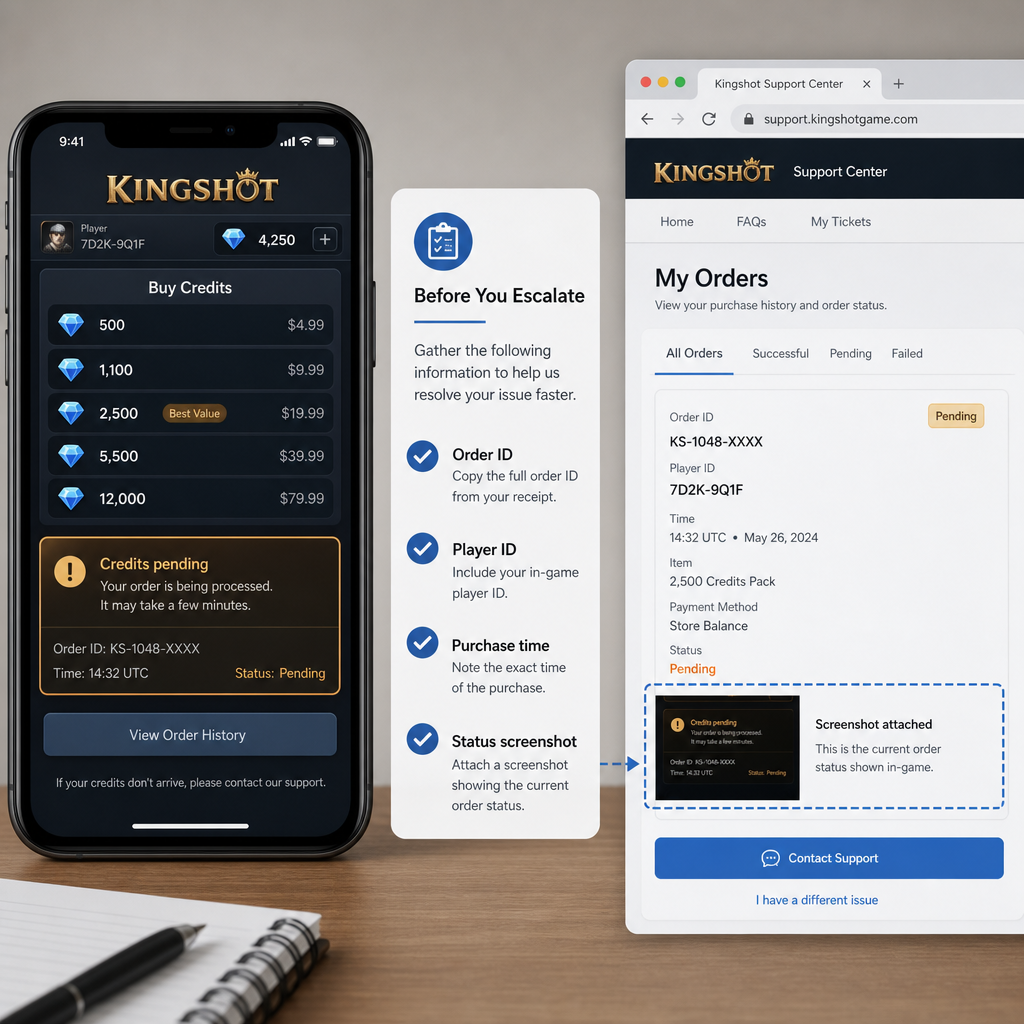
Escalation should be organized, not emotional. Before sending a stronger complaint, make sure you can answer five questions. Was the payment completed or only authorized? What is the exact order status? Which account and server were recharged? How long has the delay lasted compared with the stated delivery estimate? Has the platform or game support confirmed anything in writing?
If you cannot answer those yet, keep working through the order flow instead of escalating blindly. The order ID is the anchor. It tells you whether you are dealing with a pending order, failed payment, delivery delay, or delivered-but-missing-currency case. Each one needs a different response.
For a pending order, ask for the estimated completion time and whether you need to do anything. For a failed order, ask when the authorization will be released or refunded. For a delivered order with missing credits, ask for a delivery trace, resend attempt, or proof of the destination account. For a suspected wrong account or server, provide the intended player ID and the ID that may have been entered, if you know it.
Keep communication in one thread when possible. Opening new tickets every hour can scatter the evidence and slow the review. If you need to contact another party, such as the app store after the top-up platform, summarize what the first support team already said. Different teams do not always share systems, so connect the facts clearly.
FAQ
Why are my Kingshot credits not received even though payment succeeded?
The usual reason is a gap between payment confirmation and in-game delivery. Your payment provider may show success before the recharge platform or game server finishes crediting the account. It can also happen because of manual review, server delay, an incorrect player ID, or a delivered order that has not refreshed in the game client.
Where do I find the order ID for a delayed Kingshot recharge?
Look in the place where you paid. A top-up site usually shows it in your order history or confirmation email. An app store shows it in purchase history or on the receipt. A wallet or payment app may call it a transaction reference. Save the full ID exactly as displayed.
How long should I wait before contacting support?
Check the platform’s stated delivery window first. If the order is only a few minutes old, a short wait and one controlled restart may be enough. If the order remains pending beyond the promised time, or the status says delivered but the currency is still missing, contact support with the full order details.
Should I buy the same Kingshot pack again if the first one is pending?
No. Buying again can create duplicate charges and make troubleshooting harder. Wait until the first order status is clear. If you urgently need credits, first confirm whether the first order failed or was refunded.
What if the order status says delivered but my currency is missing?
Treat it as a delivery mismatch. Capture your current balance, the delivered order status, the receipt, and your player ID. Contact the platform first if you used a top-up service, then Kingshot support if the platform confirms delivery but the game account still does not show the credits.
Can a wrong server or player ID cause a missing currency issue?
Yes. If the recharge was attached to the wrong player ID, server, or account login, the credits may go elsewhere or fail delivery. That is why you should confirm the exact Kingshot account details before escalating.
Is a chargeback the fastest way to fix a delayed recharge?
Usually not. A chargeback may recover money in some cases, but it can also cause account restrictions or payment penalties. Use the order status workflow and support process first unless the seller is unresponsive and the order clearly failed or was not delivered.
Bottom Line
A Kingshot recharge delay is annoying, but it is usually easier to solve as an order status problem than as a mystery inside the game. Confirm the account, stop duplicate purchases, collect the full order ID, check whether the order is pending, failed, refunded, or delivered, and contact the right support channel with clean evidence.
The strongest cases are simple: one order, one player ID, one clear timeline, and screenshots that prove both payment and missing currency. If the credits arrive late, you avoid an unnecessary dispute. If they do not, you have the record needed to push for a proper review without risking your account or muddying the order history.